My agentic workflow
I plan to put all this packages into a separate repo. For now they are linked in this post directly, use as (require 'name).
My agentic workflow
I plan to put all this packages into a separate repo. For now they are linked in this post directly, use as (require 'name).
As of October 2026 I no longer write code by hand. My flow is to steer AI agents from and within Emacs to let them autonomously work on projects. As the moment of writing, my Emacs steers 25 sessions of Claude Code (95% sessions), OpenCode (running Astra) and Pi (running Astra) over two Mac machines.
Sessions are not sticky and I'm trying to start every week fresh. They store their progress in Org Mode notes (via sexps using Org API, not manual file editing).
My setup: I mostly use two Macs - (i) Mac Mini - always on homeserver (ii) MacBook Pro - working machine that I carry with me. Syncthing syncs work files between them and iCloud for personal documents.
I use several orthogonal ideas.
Vulpea (Org Roam) for Notes
I've been using Org Roam for 5 years now. I always kept notes in ~/Notes and ~/WorkNotes and had .dir-locals to support multiple root directories. Then I found d12frosted/vulpea which natively supports multiple top-level directories, and it clicked - now I can keep my (human-written) notes separately from AI-written notes, but they link between each other via IDs.
I also often move/rename files and having stable ID is a must for me; so Denote doesn't fit my workflow (I keep denotef.el btw to rename auxiliary files).
select 'notes' tbl, count(*) from notes union all
select 'files', count(*) from files union all
select 'links', count(*) from links union all
select 'properties', count(*) from properties;
| tbl | count(*) |
|---|---|
| notes | 3324 |
| files | 2446 |
| links | 39654 |
| properties | 5248 |
Emacs runs ghostel that runs agent that calls Emacs
Emacs runs ghostel that runs CLI agent that calls Emacs via emacsclient. AI is good at Elisp and it can execute arbitrary Elisp code in the running Emacs instance to change in while it running.
Excerpt from CLAUDE.md
* Emacs
Emacs configuration directory is ~/.config/emacs.  I use self-built
emacs-mac binary with native compilation support, not emacs-plus.

Whenever you see inline sexp, it's an Emacs elisp expressions.  Use
=emacsclient-eval= to evaluate elisp expressions, passing via heredoc
syntax or stdin to avoid quote escaping.  The result will be either
direct output or a file name (for long output).  Do NOT use raw
=emacsclient=.  Do NOT use HotterEmacs unless explicitly asked -
HotterEmacs is a remote Emacs instance.

#+begin_example sh
emacsclient-eval <<'ELISP'
(+ 1 2)
ELISP
#+end_example

Never update user notes - ~/Notes and ~/WorkNotes directories - on your
own unless explicitly asked by the user.

Org Mode links like =id:<id>= or =ID:<id>= are Vulpea notes.  If you need
to get note details use (vulpea-ux-get-note "<id>"), that returns
plist with keys :body - raw text, and :note - (describe-symbol 'vulpea-note)
struct.

When prompt contains (◊doc 'TERM), evaluate it and treat its output as
public API documentation.  Learn documented functions and variables for
subsequent requests.  Do not reproduce, summarize, or acknowledge
output unless explicitly asked.  Use documented APIs directly; do not
load a skill when documentation is sufficient.

When prompt contains a TODO org heading (statuses TODO or DOING), it
means you are asked to do / continue the task.  If multiple TODO
headings - use subagents to execute them in parallel.  If heading
contains a tag matching agent name - use that agent.

If text contains an elisp sexp with non-standard function - it's a
helper, usually name is self-explainatory.  If in doubt, what sexp
does, use ◊doc helper, example: (◊doc '◊grep).

Whenever you bring anything for the user, it MUST be in the form of
sexp that will bring the user there directly.  Most commonly used are
◊ff and ◊github-status, check (◊doc 'lozenge) for others.
Ghostel runs agent directly, not start ghostel, cd into dir, then run claude but {M-x agent-start-claude-code}1.
Ghostel APIs - namely ghostel-send-(key|string) - give agents
capability to talk to each other as if it was user typing into their
terminal. To read what another session is doing it's reading the
buffer string.
Tip: at any session I can mention the buffer by name and ask Claude to
do something about it, like "Figure out *Warnings* buffer and fix them
in my config".
Gotcha 2: when Emacs hangs I open claude in Terminal and say "why Emacs hung, fix it" or "Emacs is slow, fix it". I know about "kill -USR2", but Claude is doing it much better, often sending direct syscalls to alter the running process.
emacsclient-eval wrapper
emacsclient --eval works quite well unless output is big, then it
starts chunking. To prevent that I wrote emacsclient-eval wrapper.
Initially it was just always sending output into temporary file from
within emacs, then at the shell counted the size, and if it's 8KB or
less then cat it, otherwise return the full file name.
But then I realised that it's a good place to add save-excursion so that Claude can run file-based sexps or open windows or basically any sexp and my current point and windows stay intact.
Then I needed to inject the Claude process id into the sexp (more on that later), and emacsclient-eval also helped.
It's also a good place to add filtering, hooks, Jev for security assessment etc.
Start agents with agent.el
agent.el is a small package wrapping agent launchers that I use for adhoc sessions.
They exist to quickly launch an agent without first jumping into ghostel, then to shell and manually type. My drivers are {M-x agent-start-claude-code}, {M-x agent-start-pi}, {M-x agent-start-opencode}.
Also {M-x agent-copy-path-spec} - very handy - select a region and copy path spec for the agent to pinpoint the region to read.
Don't write skills, give API with (◊doc 'feature)
Enter lozenge.el. Another idea is to instead of writing skills, give agent a public API it can read and call. I have a plenty of packages for services, and ◊doc macro that returns feature doc strings so Agent reads it and calls it.
Instead of writing a skill to work with Slack, I say "read (◊doc 'slack)"; or (◊doc 'datadog) or (◊doc 'snowflake). My butler (later) skill is literally "You are the butler, read (◊doc 'butler) and catch up".
◊doc also works for ordinary functions.
output of (◊doc 'lozenge)
"== Entry point ==

Command: (◊insert-sexp)
Insert ◊ sexp and complete the command that follows it.

Command: (◊insert-lozenge)
Insert ◊ symbol.

Variable: ◊eval-look-back-lines
How many lines above point ◊eval scans for the start of a sexp.

Command: (◊eval &optional replace)
Evaluate the outermost sexp around point and echo its value.
With REPLACE (C-u), replace the sexp with its value instead,
as ‘◊eval-and-replace’ does.

Works in any major mode, so a sexp written in a note runs where it
is written.

Command: (◊eval-and-replace)
Evaluate the outermost sexp around point and replace it with its value.

A string value goes in as its text, any other value as Lisp would
print it.  A sexp run for its effect gives no output - nil, or an
object that does not print readably, like the process ‘browse-url’
starts - so it stays, as it does when evaluation fails.

== Documentation ==

Command: (◊doc thing)
Return documentation for THING.
When THING is a loadable feature (something ‘require’ can find), this
returns its public functions, variables, and struct types, sectioned
by the ‘;;;’ headings of the file that defines them - see
‘◊--doc-feature’.  Otherwise THING must already be a bound function,
variable, or ‘cl-defstruct’ type, and its own documentation is
returned alone - see ‘◊--doc-symbol’.

Output is plain text: signature or variable/struct name, then its
doc-string.

Interactively, prompt for THING, offering the symbol at point, and
browse it shortdoc-style in a *doc-THING* buffer: one entry per
symbol with a button to its full description, ‘n’ and ‘p’ between
entries, ‘N’ and ‘P’ between sections.

== Buffers ==

Command: (◊copy-buffer-name)
Copy the current buffer name to the kill ring.

Function: (◊ghostel-buffer session-name)
Switch to the ghostel buffer running the SESSION-NAME session.

== The web ==

Command: (◊github-search term &rest --cl-rest--)
Search GitHub code for TERM, narrowed to ORG and REPO.

Command: (◊github-repo repo &rest --cl-rest--)
Open REPO on GitHub.
REPO may be a bare name or ORG/REPO; a bare name is qualified
with ORG.

Command: (◊shortcut-story story)
Open the Shortcut STORY, given as an id, sc-id or [id].

Command: (◊shortcut-epic epic)
Open the Shortcut EPIC, given as an id, sc-id or [id].

Command: (◊duckduckgo term)
Search DuckDuckGo for TERM.

Command: (◊google term)
Search Google for TERM.

Function: (◊curl url &rest rest)
Request URL with ‘plz-see’, adding auth headers for the host.
METHOD defaults to ‘get’.  Headers passed explicitly win over the
auth-source ones.  NAME names the response buffer, replacing any
buffer of that name; it then takes only AS ‘buffer’, and THEN and
ELSE receive the renamed buffer.

== Git ==

Command: (◊show-commit repo ref)
Show commit REF of REPO in Magit.

Command: (◊git-status repo)
Show Magit status of REPO, a directory or a repository name symbol.

== Searching ==

Command: (◊grep repo term)
Grep REPO for the string TERM with ‘deadgrep’.

REPO is repository name (symbol or string), searched across
‘◊repo-roots’, not a full path.  TERM is a string to search for.

Command: (◊grep-re repo term)
Grep REPO for the regexp TERM with ‘deadgrep’.

REPO is repository name (symbol or string), searched across
‘◊repo-roots’, not a full path.  TERM is a string to search for.

Command: (◊grep-notes term)
Grep the work notes for the string TERM.

Function: (◊ack-rx expr &optional directory)
Run ‘ack’ in DIRECTORY for EXPR, an ‘rx’ form.

== Files ==

Command: (◊find-file repo pattern)
Open the first file matching PATTERN in REPO.
PATTERN may carry a trailing :LINE or :LINE:COL, and point lands
there.  REPO is looked up across ‘◊repo-roots’.

Function: (◊read repo pattern)
Return the contents of the first file matching PATTERN in REPO.
REPO is looked up across ‘◊repo-roots’; nil means PATTERN is a path.
A trailing :LINE reads from that one-based line through end of file.
An optional :COL after :LINE is ignored.  Read from disk without
visiting the file.

Command: (◊elpa-find-file pattern)
Open the file matching PATTERN in the elpa directory.
PATTERN may carry a trailing :LINE or :LINE:COL.  Error when two
versions of the same package match - the stale one has to go.

Command: (◊recover-all-files &optional dir)
Run ‘recover-file’ for every file in DIR that has auto-save data.
DIR defaults to ‘default-directory’.  Candidates are found from
their auto-save files (#name#); ‘recover-file’ prompts per file.

== Other ==

Variable: plz-see-base-url
Prefix to add to the URL argument of ‘plz-see’, if relative.
Relative here means, paradoxically, that the URL in question
starts with \"/\".

Variable: ◊repo-roots
Alist of roots under which a repository is looked up by name.
Each value is a directory holding repository subdirectories; the
first root containing the repository wins.

Variable: ◊doc-section-order
How ‘◊doc’ orders a feature’s sections.
‘reverse’ puts the last section of the source file first: a Lisp file
defines primitives before the things that use them, so reading it
backwards leads with what a caller wants.  ‘source’ keeps the file’s
order.  Either way an explicit order set with (put FEATURE
=’◊doc-sections =’(SECTION ...)) is honoured first, and Other
comes last.

Variable: ◊github-org
GitHub organisation assumed when a repository is named bare.

"
Lozenge is this symbol - ◊. I saw it in the Pollen publishing system by Matthew Butterick. My lozenge.el has nothing to do with Pollen except all symbols there start with ◊. This gives me a separate namespace for functions that (i) guaranteed to having no symbol collissions (ii) looks like some strange markup that I can copy-paste directly into Slack, like (◊github-search "MakePayment"). I have {C-c l l} to insert (◊) and open completing-read with the symbols, and {C-c l i} to insert ◊ symbol.
I force Claude to write using sexps, so that I can put point on them and execute with ◊eval {C-c l e}.
Here's the example output of a session, {C-c C-t} then put point inside sexp then {C-c l e}.
The Migrate Batch Jobs to k8s session is open. Squad-Projects.org
didn't change, since the heading already had a monkey-id.

(switch-to-buffer "*claude: migrate-batch-jobs-to-k8s*")
Another handy examples - you can figure out what they do:
- (◊git-status "~/.wt/proxy_remove-ecs-iac")
- (◊ff 'metadata-registry "Export/v1/schema.json")
- (◊github-search "cross_account_invoke_lambda")
- (◊grep 'repo-name "cio.trackEvent")
- (◊duckduckgo "github actions changed files")
monkey.el - flowchart-based execution
TL;DR: most typing into the claude terminal is literally this:
start monkey worker (buffer-local monkey-session-id carries ID and then the skill figures everything by looking at backlinks)
adopt monkey session for project (it derives the project from the current session name)
continue on the next :todo from monkey-task-context
monkey repo is private as it contains work details, if anybody interested I'll open it.
I'm running sessions that span weeks. No, they don't work 24/7 nor I'm token-maxxing. Session keeps track of a project, a significant feature, operational work for the week etc.
monkey.el is to:
- Keep user notes (Org Mode heading, TASK in monkey.el terminology) - in ~/Notes or ~/WorkNotes - separate from agent notes (Org Mode file in ~/Sync/Monkey, NOTE). Agent only writes to NOTE and reads from TASK.
- Add the place for Agent to break down work into ITEMS (Org Mode headings with their TODO status). It's like Plan mode, but I stopped it in favour of "here's TODOs, go do them and write results here".
- Ensure execution follows the flowchart. The flowchart itself uses monkey notation. I used graphviz, but switched to reladraw (my fork with diamond shapes).
- Ensure that agent writes to Org using sexps, adds metadata so I can quickly check what's going on.
NOTE is a separate Org file, lives under ~/Sync/Monkey that are under vulpea-db-sync-directories.
monkey.el is accompanied with Monkey-Worker.org skill that explains writing preferences, teaches notation, instructs with using flowcharts.
Monkey predates lozenge.el so I still didn't move the skill to "read (◊doc 'monkey) and act".
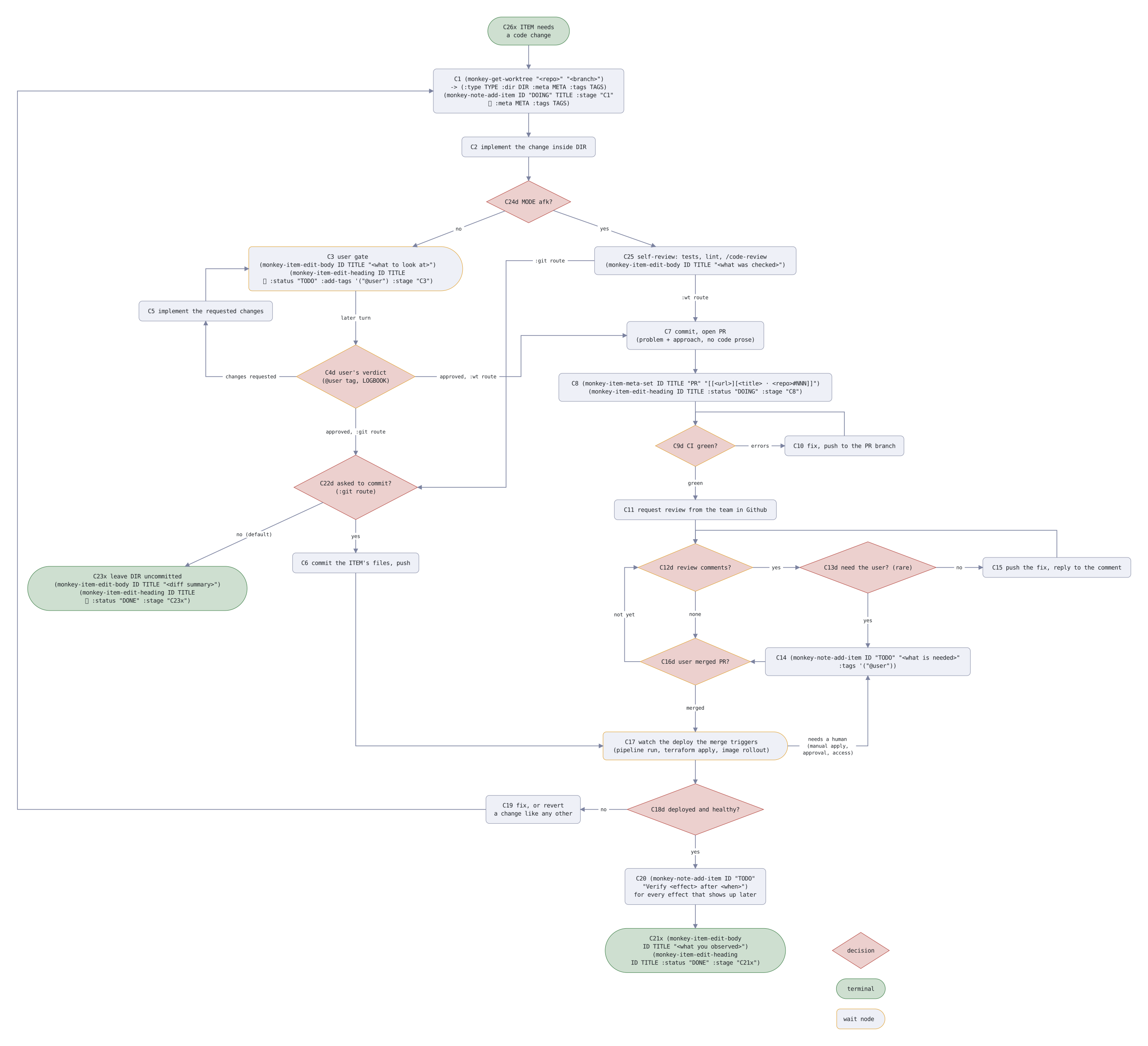
Example of flowchart - agent reads source code, I look at the graph representation. Every node has immutable code encoding node type and flowchart itself (C26x - Change Handling, x - terminal).
change handling flowchart
style decision shape: diamond fill: theme-secondary-subtle border: theme-secondary
style terminal shape: pill fill: theme-primary-subtle border: theme-primary
style wait border: #e0a030
style key text: (size: small, color: theme-muted)
default edge text: (size: small)
node C26x "C26x ITEM needs / a code change" style: terminal
node C1 "C1 (monkey-get-worktree \"<repo>\" \"<branch>\") / -> (:type TYPE :dir DIR :meta META :tags TAGS) / (monkey-note-add-item ID \"DOING\" TITLE :stage \"C1\" / :meta META :tags TAGS)" below C26x
node C2 "C2 implement the change inside DIR" below C1
node C24d "C24d MODE afk?" below C2 style: decision
node C3 "C3 user gate / (monkey-item-edit-body ID TITLE \"<what to look at>\") / (monkey-item-edit-heading ID TITLE / :status \"TODO\" :add-tags '(\"@user\") :stage \"C3\")" below-left of C24d style: wait shape: half-pill
node C25 "C25 self-review: tests, lint, \/code-review / (monkey-item-edit-body ID TITLE \"<what was checked>\")" below-right of C24d
node C4d "C4d user's verdict / (@user tag, LOGBOOK)" below C3 style: decision and wait
node C5 "C5 implement the requested changes" above-left of C4d
node C22d "C22d asked to commit? / (:git route)" below C4d (gap: wide) style: decision
node C23x "C23x leave DIR uncommitted / (monkey-item-edit-body ID TITLE \"<diff summary>\") / (monkey-item-edit-heading ID TITLE / :status \"DONE\" :stage \"C23x\")" below-left of C22d (gap: wide) style: terminal
node C6 "C6 commit the ITEM's files, push" below C22d
node C17 "C17 watch the deploy the merge triggers / (pipeline run, terraform apply, image rollout)" below C16d (gap: wide) style: wait shape: half-pill
node C18d "C18d deployed and healthy?" below C17 style: decision
node C19 "C19 fix, or revert / a change like any other" left of C18d (gap: wide)
node C20 "C20 (monkey-note-add-item ID \"TODO\" / \"Verify <effect> after <when>\") / for every effect that shows up later" below C18d
node C21x "C21x (monkey-item-edit-body / ID TITLE \"<what you observed>\") / (monkey-item-edit-heading / ID TITLE :status \"DONE\" :stage \"C21x\")" below C20 style: terminal
node C7 "C7 commit, open PR / (problem + approach, no code prose)" below C25 (gap: wide)
node C8 "C8 (monkey-item-meta-set ID TITLE \"PR\" \"\[\[<url>]\[<title> ⋅ <repo>#NNN]]\") / (monkey-item-edit-heading ID TITLE :status \"DOING\" :stage \"C8\")" below C7
node C9d "C9d CI green?" below C8 style: decision and wait
node C10 "C10 fix, push to the PR branch" right of C9d (gap: wide)
node C11 "C11 request review from the team in Github" below C9d
node C12d "C12d review comments?" below C11 style: decision and wait
node C13d "C13d need the user? (rare)" right of C12d (gap: wide) style: decision
node C15 "C15 push the fix, reply to the comment" right of C13d (gap: wide)
node C14 "C14 (monkey-note-add-item ID \"TODO\" \"<what is needed>\" / :tags '(\"@user\"))" below C13d (gap: wide) level with C16d
node C16d "C16d user merged PR?" below C12d (gap: wide) style: decision and wait
edge C26x -> C1
edge C1 -> C2
edge C2 -> C24d
edge C24d -> C3 "no"
edge C24d -> C25 "yes"
edge C25 -> C22d ":git route" from: left to: right line: (path: square)
edge C25 -> C7 ":wt route" from: bottom to: top
edge C3 -> C4d "later turn"
edge C4d -> C5 "changes requested" from: left to: bottom line: (path: square)
edge C5 -> C3 from: top to: left line: (path: square)
edge C4d -> C22d "approved, :git route"
edge C4d -> C7 "approved, :wt route" from: right to: left line: (path: square)
edge C22d -> C6 "yes"
edge C22d -> C23x "no (default)"
edge C6 -> C17 from: bottom to: left line: (path: square)
edge C7 -> C8
edge C8 -> C9d
edge C9d -> C10 "errors"
edge C10 -> C9d from: top to: top line: (path: square)
edge C9d -> C11 "green"
edge C11 -> C12d
edge C12d -> C13d "yes"
edge C12d -> C16d "none" from: bottom to: top
edge C13d -> C14 "yes"
edge C13d -> C15 "no"
edge C15 -> C12d from: top to: top line: (path: square)
edge C14 -> C16d from: left to: right
edge C16d -> C12d "not yet" from: left to: left line: (path: square)
edge C16d -> C17 "merged" from: bottom to: top
edge C17 -> C14 "needs a human / (manual apply, / approval, access)" from: right to: bottom line: (path: square)
edge C17 -> C18d
edge C18d -> C19 "no"
edge C19 -> C1 from: left to: left line: (path: square) left of C23x
edge C18d -> C20 "yes"
edge C20 -> C21x
node key_d "decision" right of C21x (gap: wide) style: decision
node key_x "terminal" below key_d (gap: tight) style: terminal
node key_w "wait node" below key_x (gap: tight) style: wait shape: half-pill
Using Monkey is like this:
- Write an Org Mode heading, add metadata (repo, project), run {M-x monkey-jack-in}, then in a session say "start monkey worker".
- Start a session (I do this from emacs-web, later), rename it after the project with "/rename project", then say "adopt monkey session".
Here's the literal content of the skill, based on ID claude reads the actual Org mode file using vulpea.
---
name: monkey-worker
description: work a Monkey TASK session in dwim fashion - "start" begins the NOTE's ITEMs, "continue" folds new TASK TODOs into the NOTE and resumes, "adopt" turns the current session into a monkey session. Use when the session has a Monkey NOTE ID (buffer monkey-session-id or session name) and the user says "start", "continue", or gives no direction, or when the user says "work here as a monkey".
---

Load the /orgmode skill first - everything written into a NOTE is Org
Mode and follows its constructs.

Read [Monkey Worker skill](id:20260716T113128.723996).
emacs-web.el
Okay, we're close to butler, the one that we're here for.
But before - emacs-web.el - a web UI to manage Emacs. It all started when I went walking acrosss the lake with my son and wanted to have mobile client for OpenCode. I asked Claude (remote) - "build me a web app with listing of Emacs buffers in Notes.app UI style". By the end of the walk I had buffers, pins, killing buffer, rendering (htmlize does this), typing into Claude, and even voice input using Whisper with custom prompt.
I'm using it now all the time, it has (i) two my Macs connecting to it (two Emacs instances); (ii) sharing buffers, so some of the Claude sessions I share with my wife - they manage her Shopify shop; (iii) voice input for memos that go into daily note.
Here's the minimal running config, after putting emacs-web.el into your load-path:
(use-package emacs-web :ensure nil
  :config (emacs-web-start))
if something's off, ask Claude to fix it.
Then you need to bring http://localhost:4678 to Internet, e.g. Cloudflare Tunnels:
cloudflared tunnel --url http://localhost:4678
my config with two machines
(use-package emacs-web :ensure nil
  :config
  (defun v/emacs-web-claude-in-notes ()
    "Start a Claude Code session in the Notes, named after the time."
    (agent-start-claude-code "~/Notes/" (format-time-string "notes-%H%M")))
  (defun v/emacs-web-opencode-in-notes ()
    "Start a OpenCode session in the Notes, named after the time."
    (agent-start-opencode "~/Notes/" (format-time-string "notes-%H%M")))
  (defun v/emacs-web-pi-in-notes ()
    "Start a Pi session in the Notes, named after the time."
    (agent-start-pi "~/Notes/" (format-time-string "notes-%H%M")))
  (defun v/emacs-web-butler-in-notes ()
    "Start the butler in the Notes, named after the time: a Claude Code
session that catches up on the other sessions every 15 minutes."
    (let ((buffer (agent-start-claude-code "~/Notes/" (format-time-string "butler %H%M"))))
      (agent-type buffer '("Load (◊doc 'butler) and act as butler"
                           "/loop 15m catch up"))
      buffer))
  (setq emacs-web-claude-resume-function
        (lambda (dir id name) (agent-start-claude-code dir name id)))
  (defun v/memo-after-send (start)
    "Tidy the text sent from the phone from START: drop the tag dictation
starts it with, fill it to the phone's width, leave a blank line
after it, and save."
    (save-excursion
      (goto-char start)
      (when (looking-at (regexp-quote "[voice input] "))
        (delete-region (match-beginning 0) (match-end 0))))
    (let ((end (point-marker))
          (fill-column (or emacs-web-sent-columns fill-column)))
      (fill-region start end)
      (goto-char end)
      (set-marker end nil))
    (insert "\n")
    (let ((delete-trailing-lines nil))
      (save-buffer)))
  (defun v/emacs-web-new-memo ()
    "Start a Memo heading at the end of today's daily note, point under it,
and save the note.  Dictation sent to it from the phone goes in
without its tag, followed by a blank line, and is saved."
    (vulpea-dailies-goto-today)
    (add-hook 'emacs-web-after-send-functions #'v/memo-after-send nil t)
    (goto-char (point-max))
    (unless (bolp) (insert "\n"))
    (insert (format-time-string "\n* Memo %H:%M\n"))
    (let ((delete-trailing-lines nil))
      (save-buffer))
    (dolist (window (get-buffer-window-list nil nil t))
      (set-window-point window (point)))
    (current-buffer))
  ;;
  (pcase (system-name)
    ("mini"
     (setq emacs-web-title "Mac mini"
           emacs-web-computers '(("Mac mini" . "./") ("M4 Pro" . "pro/"))
           ;; the shared buffers alone, for jozh.nl/pix-n-art
           emacs-web-shared-port 4680)
     (setq emacs-web-list-actions
           '(("New Claude Code session in Notes" . v/emacs-web-claude-in-notes)
             ("New OpenCode session in Notes" . v/emacs-web-opencode-in-notes)
             ("New Pi session in Notes" . v/emacs-web-pi-in-notes)
             ("New Butler" . v/emacs-web-butler-in-notes)
             ("Resume Claude session" . emacs-web-claude-resume-session)
             ("New memo" . v/emacs-web-new-memo))))
    ("m4pro"
     (defun v/emacs-web-claude-in-worknotes ()
       "Start a Claude Code session in the WorkNotes, named after the time."
       (agent-start-claude-code "~/WorkNotes/" (format-time-string "worknotes-%H%M")))
     (setq emacs-web-title "M4 Pro"
           emacs-web-computers '(("Mac mini" . "../") ("M4 Pro" . "./"))
           ;; the Mini's Whisper hears dictation for both
           emacs-web-transcribe-at "../")
     (setq emacs-web-list-actions
           '(("New Claude Code session in Notes" . v/emacs-web-claude-in-notes)
             ("New Claude Code session in WorkNotes" . v/emacs-web-claude-in-worknotes)
             ("New OpenCode session in Notes" . v/emacs-web-opencode-in-notes)
             ("New Pi session in Notes" . v/emacs-web-pi-in-notes)
             ("New Butler" . v/emacs-web-butler-in-notes)
             ("Resume Claude session" . emacs-web-claude-resume-session)
             ("New memo" . v/emacs-web-new-memo)))))
  ;;
  (emacs-web-start))
butler.el
Butler is a Claude session stat steers other ghostel sessions across both of Macs.
Butler started with these instructions:
you're a butler, load (◊doc 'butler) and catch up every 30 minutes
It knows ghostel sessions by listing buffers in Emacs, then goes to each session and types there:
Report briefly: what you delivered in this session, what is left unfinished, and what needs my decision.
After Butler collected status, it decomposes status into asks for the user, giving each ask a sequential ID and places them into the ring, so user (me) always presented with a single action, stating the ID, it's type (D - Decision, B - Blocked, U - User action needed), session name and details.
Pager
- github
- velppa/claude-pager
Claude, OpenCode and Pi are configured with EDITOR=emacs-pager, so
typing {C-g} opens a new Emacs buffer where I can type an answer,
press {C-c C-c} to confirm or {C-c C-k} to abort. For Claude, the buffer
also contains the session transcript with tool calls converted into Org syntax,
tables are arranged etc.
Pager closes the gap of navigating and working with the session transcript as a real buffer. Ghostel' modes are great, but they are still behind ordinary buffer.
Tip: use org-store-link (I bound it at {C-c n L} and then in the prompt buffer org-insert-link, {C-c n I} to insert the pointer for agent to check/act on.
emate.el
Emate is an Elisp implementation of kunchenguid/firstmate that uses Emacs/ghostel instead of tmux/Bash for steering. I also removed all the bluff of "adress user as a Captain".
I used it for a week and then switched back to Monkey Workers + Butler steering.
Auxiliary stuff - reload.el, Monkey Kanban, Stepper
There are some helper packages for my use case - using two Macs.
- refresh.el - automatically reloads the package when it was changed. Helpful when a session on Mini changes the package and Emacs on MBP picks it up.
- Monkey Kanban is a Go app that renders Monkey sessions on a Kanban board. Links open Emacs using org-protocol.
Stepper is my implementation of AWS StepFunctions - replacement for Claude Routines and Datadog Synthetics. Whenever I want to run AI on schedule, I create a StepFunction.
Examples:
- credentials updaters (login into SSO every few hours)
- proactive service monitoring (runs a skill that checks metrics and logs in Datadog and Kubernetes)
- handling Datadog Cases (I even had instruction "whenever new case arrived, start a monkey session with the fix" - and observed PRs opened, with humans as bottleneck, so disabled it for now)
- monitoring YouTube and generate summaries.
- summaries for changed tickets in the past working day in Shortcut (like Jira).
gptel
I was using gptel heavily before Claude Code became so useful. I still have {C-c j} prefix for gptel actions, but using it less and less these days. Some useful functions that I have:
- v/gptel-summarize-buffer
- v/gptel-generate-commit-message