Search / 31 matching notes

Notes &
other things.

2026

Links <2026-04-16 Thu>

Links <2026-04-16 Thu>

Improve public notes

Next round of improving Textpod on <2026-04-15 Wed>.

Improve public notes

Next round of improving Textpod on <2026-04-15 Wed>.

Deploy publicly –

Introduced --base-path flag, to serve notes under sub-path.

To start Textpod with sub-path, use:

textpod --token $TEXTPOD_TOKEN --base-path notes
Publish textpod.el to the repository

textpod.el is a companion Emacs package for quick publishing notes from Org Mode documents.

Install it like this:

(use-package textpod
  :config
  (setq textpod-token (cadr (auth-source-user-and-password "finita.myaddr.dev" "textpod")))
  (setq textpod-url "/notes"))

Then these helper functions do the heavy-lifting:

  • textpod-org-region-to-note: Convert the Org region between BEG and END to Markdown and send to Textpod.
  • textpod-org-heading-to-note: Send the current heading’s subtree to Textpod.
  • textpod-open-current-note: Open the current heading’s Textpod note in a browser.

When creating a note, textpod.el sets TEXTPOD_ID property that's equal to node'id.

Change separator in notes.md to ^L

Default separator \n\n---\n\n is fragile as it requires exactly two newlines before / after the note. I often messed up notes when editing notes.md file manually. To fix that, I replaced it with ^L character (insert in Emacs via C-q C-l) which usually represents new pages.

Fix attachments links

Attachement links need to respect --base-path flag.

Handling attachments

My current workflow:

  • Assets are stored next to Notes under assets/ directory

  • I can quickly search for them, then open in Emacs/qView:

    find ../assets -name "*prefix-in-emacs*"
    
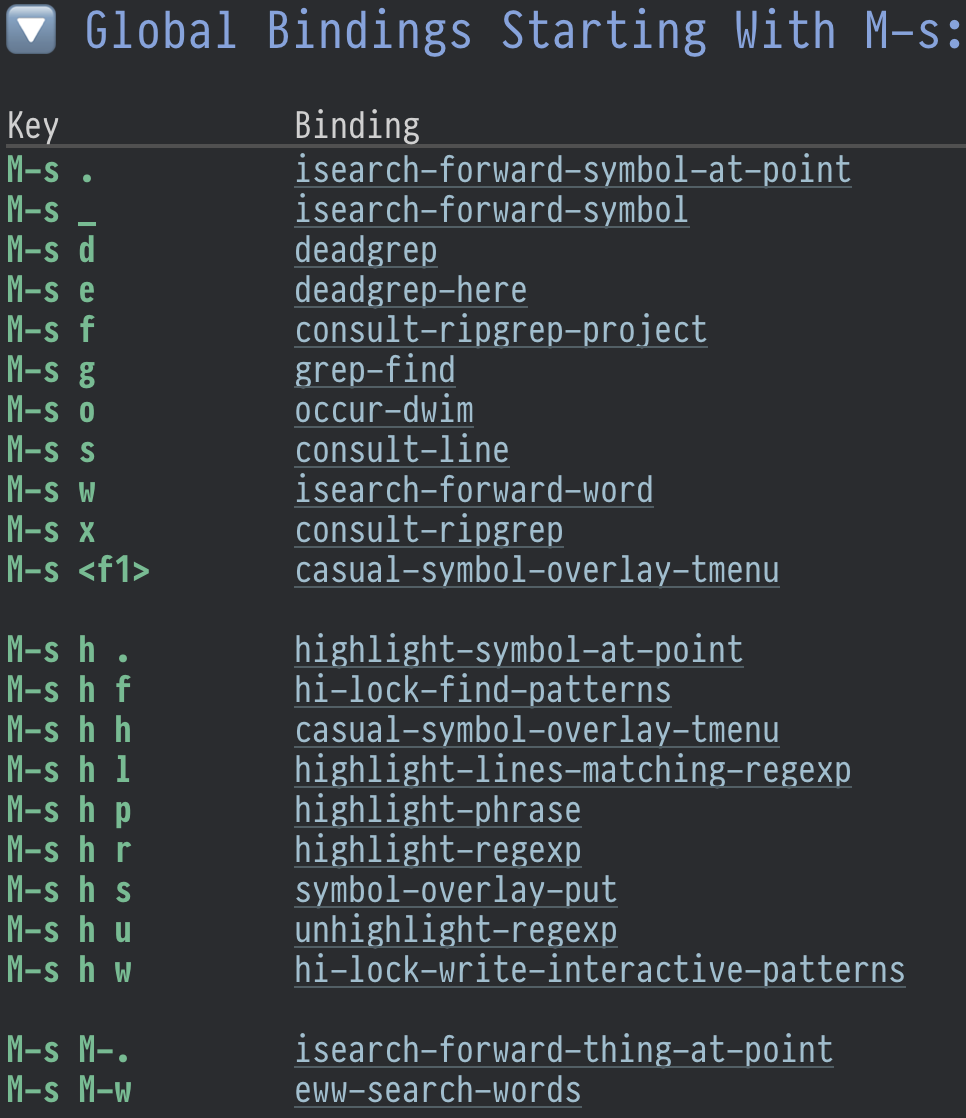
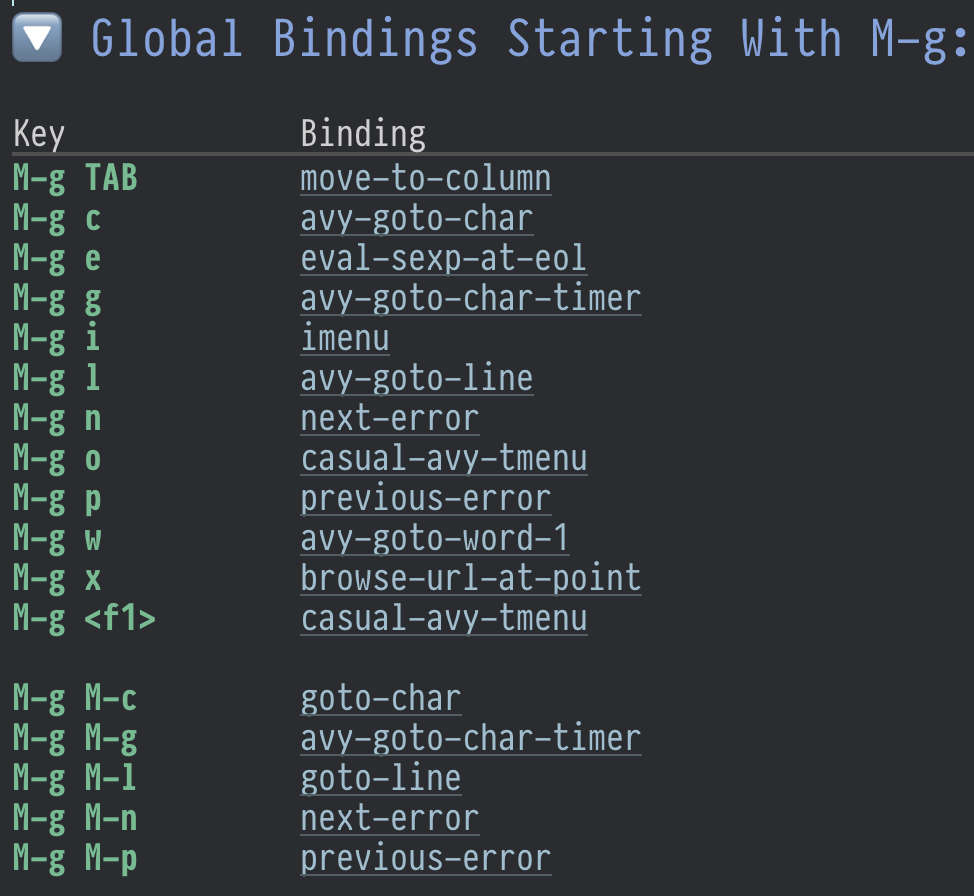
    ../assets/m-g-prefix-in-emacs.png
    ../assets/m-s-prefix-in-emacs.png
    
  • I can reference an asset as an image: img

  • An image is a link to an image file that does not have a description part (Images (The Org Manual)).

  • Textpod already support images. What happens when I drag-n-drop an image file to the textarea? Textpod copies them under attachments directory.

What I want:

  • When creating a public note containing an image via API (using textpod.el), copy the asset to assets/ directory, mimicing the directory structure in the notes.
  • I need another API endpoint - POST /notes/assets/<name>, accepting binary as payload.

Okay, I implemented it, let's test.

textpod-org-heading-to-note

Prompt: Implement textpod-org-heading-to-note function, it should select current (top) heading - the one that has TEXTPOD_ID parameter, and call textpod-org-region-to-note on it.

The command {M-x textpod-org-heading-to-note} works!

Should the textpod id be just id?

Currently I use TEXTPOD_ID property. If using ID property, notes will automatically become Org-roam nodes. Currently IDs are generated as timestamps via (setq org-id-method 'ts) with nanoseconds precision. Then it will come with seconds precision. I will need to a prefix, to be able to quickly find them (e.g. with {M-x deadgrep}).

Wrap h3 into details on index page

To declutter the index page, h3 markdown headings (h2 Org headings) are wrapped into <details> tag. The note page renders normally, showing table of contents on the left sidebar.

Trying Textpod once again

On <2026-04-13 Mon> I installed Textpod on Mac Book Pro M1 using Cargo (Rust tooling).

Trying Textpod once again

On <2026-04-13 Mon> I installed Textpod on Mac Book Pro M1 using Cargo (Rust tooling).

Good:

  • Separate from notes, and from blog.
  • Managing ton of markdown files for small notes that I produce - huge overkill
  • I want something like this, write in org-mode, press a button (call elisp function) and heading is sent to website.
  • Open source, so I can fork and improve it for my needs.
    • ☑ make a fork - ~/Developer/src/github.com/velppa/textpod
  • Can make it prettier.

Open questions:

  • ☑ Does it have an API? Like I would select a Org text, convert it to Markdown and send to Textpod.
    • use {M-x textpod-org-region-to-note} function
  • ☑ How to increase font? Increased in the sources.
  • ☑ Token access, for hosting on finita-la-comedia
  • ☑ Internal Org Roam links are pasted as markdown files. So in theory, I could somehow expose them.

I ended up forking it to https://github.com/velppa/textpod and greatly improving it for my needs. You're reading notes served by Textpod v0.2.0. It is my project.

Notable changes:

  • Read-only mode with token authentication: The app now supports an optional --token flag that enables authentication. When a token is set, users without the token see a read-only interface where they can only search notes. Access is granted via a ?token=X query parameter (which sets a cookie) or a Bearer token in the Authorization header. The UI dynamically adjusts based on authentication status, hiding edit/delete controls and changing the editor placeholder for unauthenticated users.
  • Enhanced note management: Notes now have unique IDs based on timestamps, enabling direct access via /note/:id URLs. PUT method allows editing notes (upserting if not found).
  • Subpath support: to deploy on your domain under subpath, supply --base-path notes flag. Then notes will be under /notes subpath.
  • The app watches the notes file for external changes and automatically reloads.
  • The link archiving feature lets users prefix URLs with + to both raw urls and Markdown-formatted.
  • Special handling of links to .md files: They appear when exporting from Org-roam. These are internal links and Textpod now turns them into search by filename, effectively returning all mentions of this concept. Poor man zettelkasten import.
  • UI improvement: larger fonts, footer, better code snippets for dark mode, tags on the heading.
  • textpod.el: Companion Emacs package for quick sending notes to Textpod.

Later changes to setup will go into separate notes.

Snowflake MCP server

MCP server for Snowflake.

Snowflake MCP server

MCP server for Snowflake.

kumo – local AWS emulator in Go

Similar to Openstack. A lightweight AWS service emulator written in Go.

kumo – local AWS emulator in Go

Similar to Openstack. A lightweight AWS service emulator written in Go.

Claude Code quota exhausted / degraded quality

Claude Code apparently degraded in coding tasks.

Claude Code quota exhausted / degraded quality

Claude Code apparently degraded in coding tasks.

mist – collaborative Markdown editor

Mist is an online collaborative Markdown editor, with comment support. Downside: documents live for 99 hours.

mist – collaborative Markdown editor

Mist is an online collaborative Markdown editor, with comment support. Downside: documents live for 99 hours.

author
Matt Webb (https://interconnected.org)
website
mist
github
inanimate-tech/mist
posts
curl https://mist.inanimate.tech/new -T file.md
md-publish-file function

Wrap that into md-publish-file Elisp function, interactively picking the file.

Here's an md-publish-file function that uploads a Markdown file to mist:

(defun md-publish-file (file)
  "Upload FILE to mist.inanimate.tech and return the URL.
Interactively, prompt for a Markdown file."
  (interactive
   (list (read-file-name "Markdown file to publish: "
                         nil nil t nil
                         (lambda (name)
                           (string-match-p "\\.md\\'" name)))))
  (unless (file-exists-p file)
    (user-error "File does not exist: %s" file))
  (let* ((output (shell-command-to-string
                  (format "curl -s https://mist.inanimate.tech/new -T %s"
                          (shell-quote-argument (expand-file-name file)))))
         (url (string-trim output)))
    (if (string-match-p "^https://mist\\.inanimate\\.tech/" url)
        (progn
          (kill-new url)
          (message "Published to: %s (copied to kill ring)" url)
          url)
      (error "Upload failed: %s" output))))

This function:

  • Prompts for a .md file interactively
  • Uploads it using curl
  • Copies the URL to the kill ring
  • Returns and displays the URL

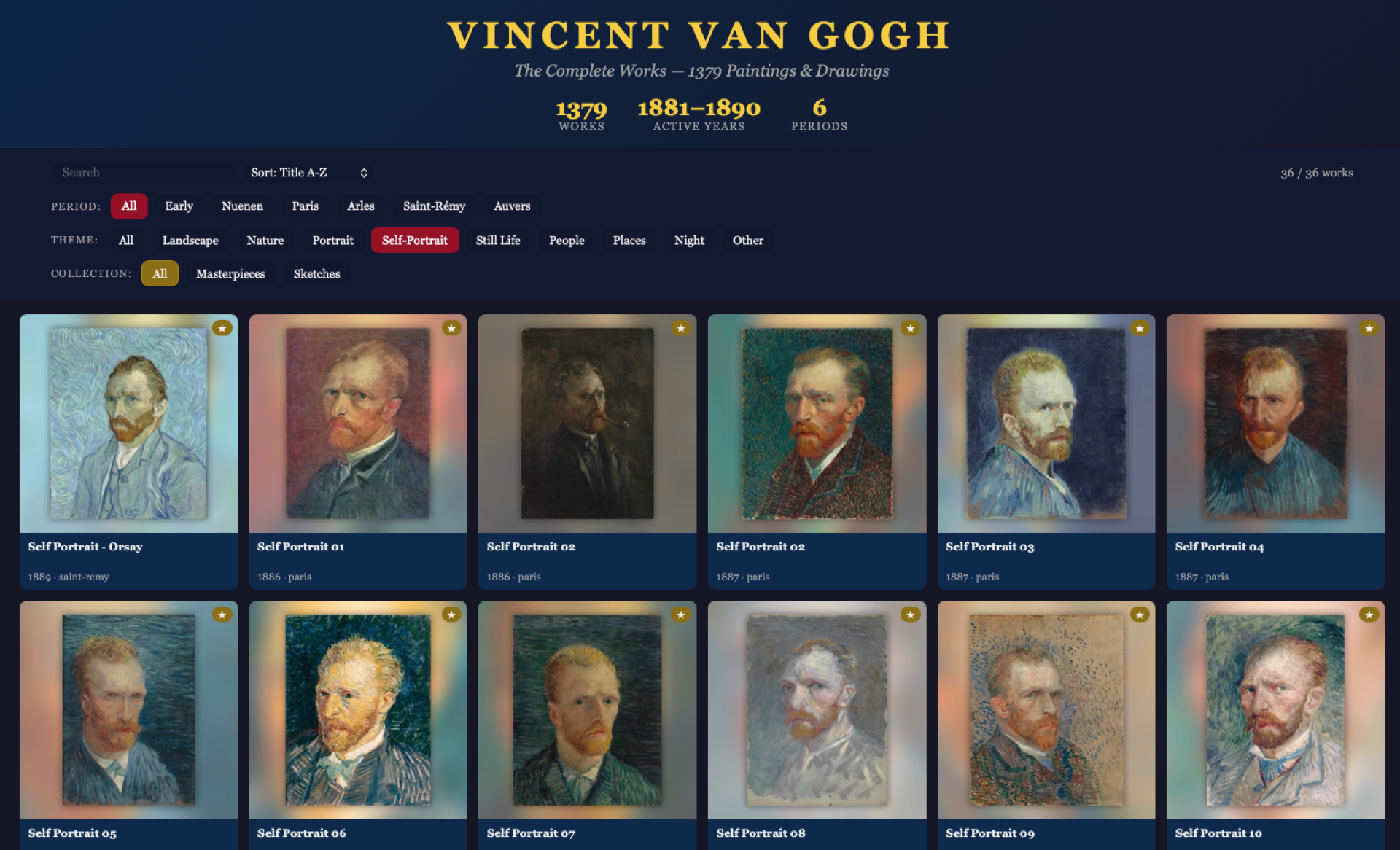
Vincent Van Gogh gallery

I found on my external drive a collection of Vincent Van Gogh paintings, that I converted into desktop wallpapers using Backgroundifier app (archagon/backgroundifier-public) severa…

Vincent Van Gogh gallery

I found on my external drive a collection of Vincent Van Gogh paintings, that I converted into desktop wallpapers using Backgroundifier app (archagon/backgroundifier-public) several years ago.

The collection is pretty big, 1380 paintings. To explore it in a better way than just going through files on a disk, I built an interactive galler that serves images directly from my external drive; also had to prepare thumbnails for faster loading.

Check it out here: https://uiuo.nl/van-gogh/, not bad for couple hours of work, don't you think?

260503--van-gogh-gallery__screenshot.png

2025

M-s and M-g prefixes in Emacs&#xa0;&#xa0;&#xa0; :Blog:

Let's talk about two semantic and useful prefixes in GNU Emacs - M-s and M-g. Semantics is there - M-s is for "search", M-g is for "go".

Blog

M-s and M-g prefixes in Emacs   

· :Blog:

Let's talk about two semantic and useful prefixes in GNU Emacs - M-s and M-g. Semantics is there - M-s is for "search", M-g is for "go".

M-g is for Go
M-g l
go to line
M-g c
go to char
M-g g
go go go
M-g M-g
also "go go go", for convenience, hold Alt and press g g twice.
M-g w
go to word, asks for the first character of a word and jumps there.
M-g C-h
I ran out of remembering keybindings, so this one is list all of them – add C-h after any prefix and Emacs will show you the help. No need to use which-key unless necessary, you're in control - you'll memorise things only looking first into memory, if missing - take action to learn (and thus remember). which-key is a false friend for new Emacser, beware!

Checking the keymap, we see many aliases like M-g M-g, so M-g M-c, M-g M-l, M-g M-n and so on, they are for mnemonical convenience.

Most of movements run avy, which can do anything, it's an awesome way of arbitrary movements and beyond.

m-g-prefix-in-emacs.png
M-s is for Search

M-s is an entrypoint to search-related things. 95% of the time I use M-s d (deadgrep) and M-s o (occur).

M-s d runs deadgrep, a frontend for ripgrep for searching in the current project. I use it all the time, and nowadays with rise of LLM, making your project greppable is must have to enable AI to do sensible changes in the project.

M-s o is mighty M-x occur, but adjusted to "do what I mean" semantics – if selection is active, it runs "occur" on it, otherwise prompts for input.

(use-package emacs
  :config
  (defun occur-dwim (&optional _)
    "Run occur with Active Region if any, otherwise regular occur."
    (interactive)
    (if (use-region-p)
        (occur (buffer-substring-no-properties (region-beginning) (region-end)))
      (call-interactively 'occur)))
  (keymap-global-set "M-s o" #'occur-dwim))

M-s h is highlighing prefix, which deserves a separate post. So see you later, cheers!

m-s-prefix-in-emacs.png

Trying gptel-quick

karthink/gptel-quick is an Emacs Package to do quick LLM lookups of selected region.

Trying gptel-quick

karthink/gptel-quick is an Emacs Package to do quick LLM lookups of selected region.

On <2025-06-12 Thu> I installed it using this snippet:

(use-package gptel-quick :ensure t
  :vc (:url "https://github.com/karthink/gptel-quick" :branch "master")
  :bind (("C-c j l" . gptel-quick)))

Now, when I select a region and press {C-c j l}, gptel-quick opens a posframe at point with short explaination of the term. Works well, akin to built-in macOS feature "Lookup", but powered by LLM hense can give context-aware answers.

Check videos in karthink/gptel-quick, they are good.