Integrating format-all with terraform-ts-mode

· :Emacs:

In order for format-all picks up terraform-fmt formatter of Terraform files, when using Tree Sitter with terraform-ts-mode, the mode should be registered in language-id package like this:

(when-let ((terraform-def (assoc "Terraform" language-id--definitions)))
   (setcdr terraform-def '(terraform-mode terraform-ts-mode)))

Added to Pavel's Emacs Configuration v3 to (use-package format-all) block.
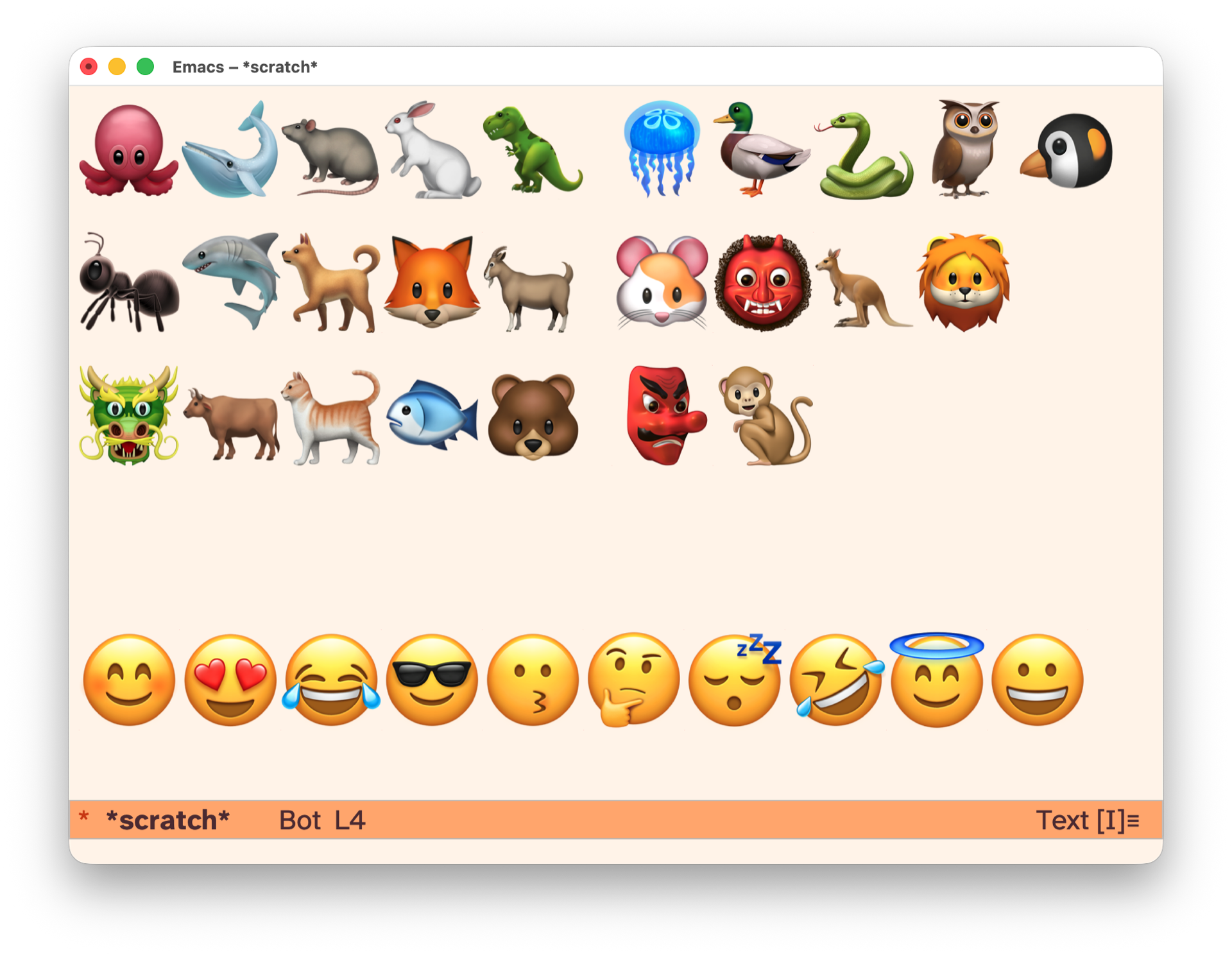
kids-unicode-mode

Emacs supports Unicode:

(insert-char (char-from-name "T-REX")) ;; 🦖

To have fun with kids, I wrapped kids-unicode minor mode that brings keymap redefining every key to insert emoji. Enable with {M-x kids-unicode-mode} and have fun typing, encoding names with emojis and train memory.

(use-package kids-unicode-mode :ensure nil)

Source: kids-unicode-mode.el

Showcase: 260516--kids-unicode-mode__screenshot.png

Superpowers

An agentic skills framework & software development methodology that works.

github
obra/superpowers
CAVEMAN vs Superpowers

Stacking: orthogonal. Run both → superpowers process + caveman terse output.

caveman

Purpose
output compression, cuts tokens ~75%
Affects
how Claude speaks — style only
Skills
caveman, caveman-commit, caveman-review, caveman-compress, caveman-stats, caveman-help
Agents
cavecrew-investigator, cavecrew-builder, cavecrew-reviewer (compressed output)
When active
persistent mode (every response)
Token cost
saves tokens

superpowers

Purpose
workflow scaffolding, methodology + process skills
Affects
what Claude does — multi-step procedures
Skills
brainstorming, writing-plans, executing-plans, test-driven-development, systematic-debugging, subagent-driven-development, dispatching-parallel-agents, using-git-worktrees, requesting-code-review, receiving-code-review, verification-before-completion, finishing-a-development-branch, writing-skills, using-superpowers
Agents
none direct
When active
invoked per-task (Skill tool)
Token cost
spends tokens (more thorough flows)

New agent skill – youtube-monitor

Below is the content of ~/.claude/skills/youtube-monitor/SKILL.md that I fully wrote myself. You can see results by searching for YouTube tag. I added a Claude Routine to run this skill daily. Let's see how it would work.

---
name: youtube-monitor
description: Monitor and summarize new YouTube videos from channels I follow.
compatibility: Requires curl and network access.
allowed-tools: Bash WebSearch
---

## Instructions

### Step 1: Identify channells that I follow

Check `elfeed-feeds` variable in Emacs (via `emacsclient`), filter YouTube
channels.

### Step 2: Find latest videos using /youtube-finder skill

Exclude shorts.

### Step 3: Find new videos that were not yet summarized

Run this shell command, providing correct user handle of the channel:

```sh
cat ~/Notes/youtube_summaries.org | grep -E '(<handle>)' -A5 | head -n 10
```

In results will be the last summarized video, all videos after that are new.

### Step 4: Summarize each new video

Summarize each new video using /youtube-summarizer skill, write new
summary to ~/Notes/youtube_summaries.org file as the first heading,
using this template:

```org-mode
* <title of the video> – <name> (<handle>)   YouTube
:PROPERTIES:
URL <url of the video>
DURATION <MM:SS>
PUBLISHED <YYYY-MM-DD DOW>
END
- <url of the video>

<abstract>

/summary generated by my "YouTube summarizer" AI skill./

<full summary, if using subheadings, only H2 are allowed>
```

caveman

github
JuliusBrussee/caveman
HN
Caveman: Why use many token when few token do trick | Hacker News
YouTube
No way this actually works - YouTube - ThePrimeTime

Why use many token when few token do trick — Claude Code skill that cuts 65% of tokens by talking like caveman.

I tried it on <2026-04-11 Sat> on Mac Mini 2024 and on Mac Book Pro M1.

claude plugin marketplace add JuliusBrussee/caveman && claude plugin install caveman@caveman
claude plugin uninstall caveman@caveman && claude plugin marketplace remove caveman

Uninstalled after reading HN comments. Installed again recently.

Caveman in gptel

Add caveman as a gptel directive:

(setq gptel-directives
      (cons '(caveman . "CAVEMAN MODE: Drop articles/filler/pleasantries/hedging. Fragments OK. Short synonyms. Pattern: [thing] [action] [reason]. [next step]. Keep full technical accuracy. Code unchanged.")
            gptel-directives))

Select with C-c C-d in gptel buffer.

HN comments summary

A developer created "Caveman," a Claude Code skill that forces the AI to respond in simplified, caveman-like language to reduce token usage by approximately 75%. The author clarifies this is mostly a joke and targets visible output (removing preambles and filler text), not the hidden "thinking" tokens that improve performance. They acknowledge the ~75% claim needs proper benchmarking and note that the skill doesn't affect code quality itself.

The Hacker News community is highly skeptical, with many arguing that tokens are "units of thinking" for LLMs—reducing them could make the model dumber by limiting its reasoning capacity. Critics point out that chain-of-thought reasoning requires verbose output, and forcing concise responses may degrade performance. However, some find the concept useful for cutting through verbose AI responses, comparing it to telegram-style communication or noting that similar concise prompting can work without harming quality for simple tasks. The debate centers on whether this actually saves meaningful costs versus potentially sacrificing accuracy.

SafariTabs.app v0.2.0

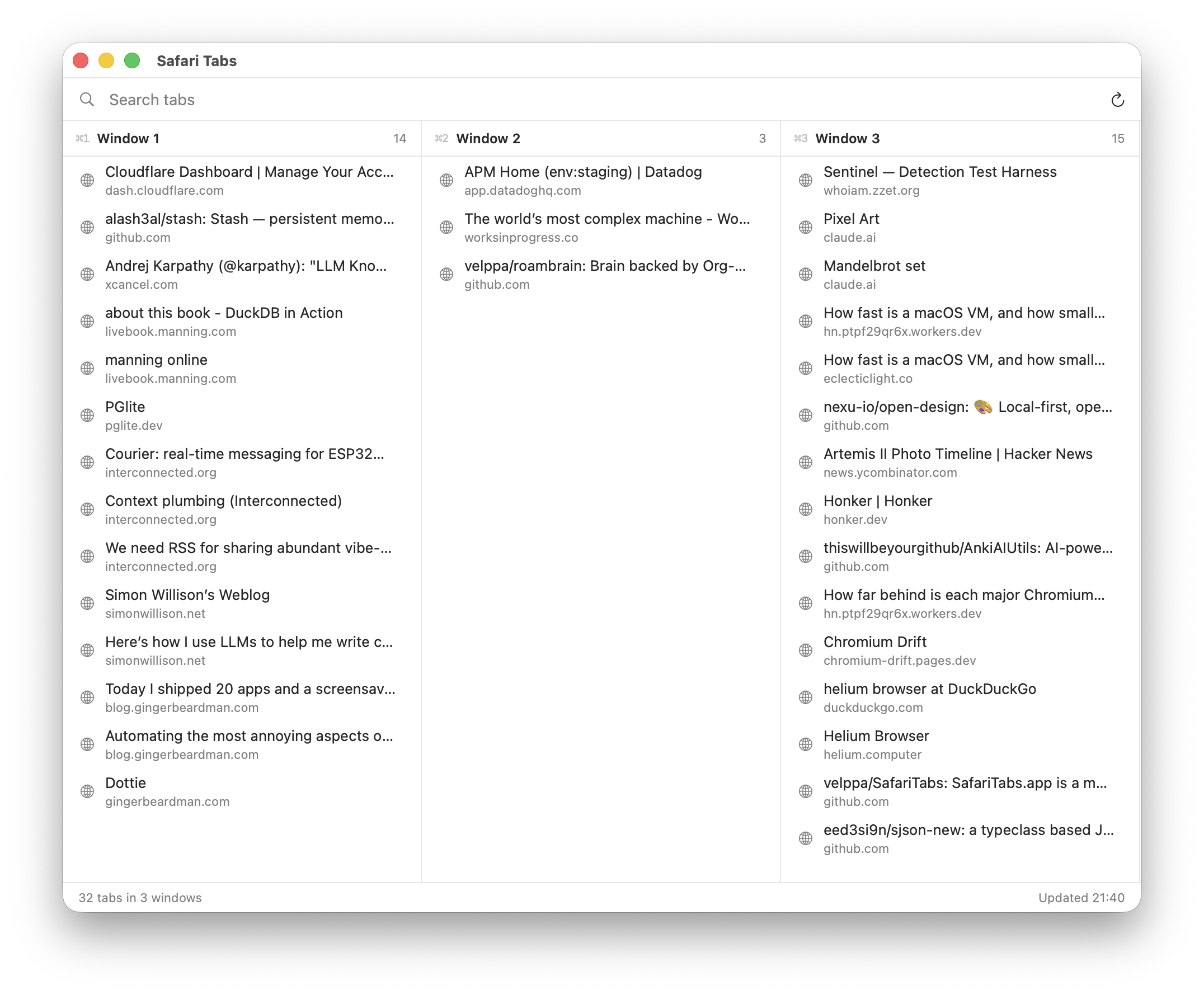
On <2026-05-07 Thu> I do several improvements to SafariTabs.app.

  1. Dragging swimlanes, so I can rearrange them to follow Spaces 3, 4, 5.
  2. Rename windows, mine are "Personal", "Work – Tech", "Work – Communications"
  3. Auto-sized swimlanes: each column takes 1/3 of the app window, capped at 1/6 of the current display — so a half-screen window always fits 3 columns and a maximised one fits 6, on any resolution.
safari-tabs.png

elpa-find-file function

· :Elisp:Emacs:

While researching internals of agent-shell I needed to quickly visit Elisp files by name. Here's the helper, which takes the file name and finds it within installed packages.

Examples:

  • (elpa-find-file "agent-shell.el")
  • (elpa-find-file "avy.el")
(defun elpa-find-file (pattern)
  "Open first file matching PATTERN in the elpa directory.
Error if multiple versions of the same package match."
  (interactive "sFile: ")
  (let* ((elpa-dir (expand-file-name "elpa" user-emacs-directory))
         (files (thread-first
                  "rg --files %s | grep -F \"%s\" | grep -v '\\.elc$'"
                  (format (shell-quote-argument elpa-dir) pattern)
                  shell-command-to-string
                  split-string))
         (pkgs (mapcar (lambda (f)
                         (let ((dir (cadr (split-string f "/elpa/"))))
                           (replace-regexp-in-string
                            "-[0-9].*?/.*\\'" "" dir)))
                       files))
         (dups (seq-filter (lambda (p)
                             (> (cl-count p pkgs :test #'string=) 1))
                           (seq-uniq pkgs))))
    (when dups
      (user-error "Multiple versions found for: %s — clean up %s"
                  (string-join dups ", ") elpa-dir))
    (unless files
      (user-error "file %s not found" pattern))
    (find-file (cl-first files))))
Support to jumping to a :line:column

Okay, almost immediately I wanted something like this - (elpa-find-file "agent-shell.el:4616"), which is essentially what visit-source.el does. But, it turned out better not integrate visit-source, but implement parsing of line directly in the function.

So, version 2:

(defun elpa-find-file (pattern)
  "Open file matching PATTERN in the elpa directory.
PATTERN may include a trailing :LINE or :LINE:COL.
Error if multiple versions of the same package match."
  (interactive "sFile: ")
  (let* ((parts (split-string pattern ":"))
         (name (car parts))
         (line (and (nth 1 parts) (string-to-number (nth 1 parts))))
         (col (and (nth 2 parts) (string-to-number (nth 2 parts))))
         (elpa-dir (expand-file-name "elpa" user-emacs-directory))
         (files (thread-first
                  "rg --files %s | grep -F \"%s\" | grep -v '\\.elc$'"
                  (format (shell-quote-argument elpa-dir) name)
                  shell-command-to-string
                  split-string))
         (pkgs (mapcar (lambda (f)
                         (let ((dir (cadr (split-string f "/elpa/"))))
                           (replace-regexp-in-string
                            "-[0-9].*?/.*\\'" "" dir)))
                       files))
         (dups (seq-filter (lambda (p)
                             (> (cl-count p pkgs :test #'string=) 1))
                           (seq-uniq pkgs))))
    (when dups
      (user-error "Multiple versions found for: %s — clean up %s"
                  (string-join dups ", ") elpa-dir))
    (unless files
      (user-error "file %s not found" name))
    (find-file (cl-first files))
    (when line
      (goto-char (point-min))
      (forward-line (1- line))
      (when col (forward-char (1- col))))))

visit-source.el

· :Emacs:Elisp:

visit-source.el is an utility Emacs package to quickly go to a file at point (under cursor). I bind (keymap-global-set "H-RET" #'visit-sourse) and can quickly go to files with line precision from anywhere, including log outputs.

Installation

grab a file visit-source.el, put it somewhere on load-path, bind to a key – I have it within ffap package:

(use-package ffap :ensure nil
  :config
  (require 'visit-source)
  ;;(setq ffap-file-finder #'visit-source)
  (setq ffap-file-finder #'find-file)
  :bind (("H-<return>" . visit-source)))
Usage

In any buffer put a point on a file-looking string and call {M-x visit-source RET} (or {H-<return>} for me).

File-looking string can be:

  • a filename
  • a filename with lines (as in exception or log output)
History

When I first find it on r/emacs comment, it was much simpler version and was intended as drop-in replacement for find-file. Then I added project awareness, so you can visit-source on a file Pavels-Emacs-Configuration-v3.org by filename, from anywhere in the project.

Initially I adopted visit-source instead of find-file {C-x C-f} but then switched to find-file-at-point that has a bit different semantics and kept visit-source at {H-RET} separately.

visit-source v0.3.0

visit-source worked in most cases, but still had some rough edges, like didn't parse when path at point ends with dots, so text like ../Pavels-Emacs-Configuration-v3.org. didn't parse, so I had to manually end sentences with "../Pavels-Emacs-Configuration-v3.org file." or "../nv directory." Yesterday I bumped into the need to visit arbitrary Org Mode link. {C-c C-o} runs OS open on it, so log files were opening with TextEdit.app for me. Surely I can reconfigure it in macOS level to associate Emacs with log files (via UI?); but visit-source looks the way for it.

Given personal tooling reneissance, with Claude Code on <2026-05-06 Wed> I asked it to refactor the code - extract helper pure functions, implement fixes, support Org Mode links, get rid of trailing punctuation, add tests.

So meet visit-source v0.3.0 – visit-source.el!

terraform-ts-mode

At work I work with Terraform, so need to edit quite a lot of tf files in GNU Emacs. There's no built-in terraform-ts-mode Emacs package and I don't want to install regexp-based terraform-mode package

Existing terraform-ts-mode is this: kgrotel/terraform-ts-mode, which claims being experimental. So it's a good opportunity to learn how to create major modes using Tree Sitter and on <2026-05-05 Tue> I built my own with Claude Code.

Installation: put terraform-ts-mode.el to load-path.

Usage:

(use-package terraform-ts-mode :ensure nil
  :init
  (add-to-list 'major-mode-remap-alist '(terraform-mode . terraform-ts-mode)))

With this knowledge, the next step is [TK: try mickeynp/combobulate package].

SafariTabs.app

We need RSS for sharing abundant vibe-coded apps post by Matt Webb mentions Tabulator app, part of Wall of Apps by Matt Sephton. All the apps there share the same minimalist design, native Swift UI, tiny and, supposedly, fast. The downside is that they are paid.

I wanted to try Tabulator, as I use seal_safari_tabs.lua with Hammerspoon. So I built SafariTabs.app (using Claude Code, a project), source code is here – velppa/SafariTabs. Version v0.1.0.

260508--safari-tabs-v0-1-0__app_macos.png

Features:

  • Fuzzy-searching for tabs
  • Keyboard navigation
  • Switching to the selected tab
  • Close tab
  • Headless mode, "safaritabs:" URL scheme

Let's see if I'm going to use it, if yes – will think about publishing a release. If you want to build it – clone the repo and ask Claude Code to build it.