reddigg extensions: reddigg-rss and reddigg-images-to-html

· :Elisp:

In Update Reddigg is now a fullblown reddit client : r/emacs the reddigg.el author, u/Goator, asked me to share extensions I've (well, Claude Code) written for reddigg. Sharing.

reddigg-rss
advice reddigg to use RSS feed instead of json as Reddit blocked the latter
reddigg-images-to-html
create standalone HTML with all the images from current view in masonry grid

Here's my reddigg configuration block:

(use-package reddigg
  :config
  (require 'reddigg-images-to-html)
  (require 'reddigg-rss))

Embedding Imgur posts

Imgur post can carry multiple images. Can be useful for notes.

Yes, it's sending my images to some company on the internet, so I (eventually) better self-host it, but Imgur has been alive for a long time and I like it.

Let's try to embed Imgur post:

Textlog replies flow

textlog

monkey-id
textlog.el

A quiet, text-only microblogging platform, open-source, no JS.

HN
Show HN: textlog
github
stagas/textlog
website
https://textlog.cc
(no term)
(◊ff 'velpa "textlog.el")

I created handle @hotter and ./src/textlog.el package to send regions to textlog.

Microblogs, related to Textpod.

Another self-hosted microblogs and related:

Implement textlog.el

~/.velppa/velpa/textlog.el

Use new API methods

textlog-post should be using POST /posts method.

Implement textlog-reply command

It should get recent replies to the current user in completing-read.

Upon selection a message, store its id, then post new message (read interactively).

Textlog replies flow

Assign CapsLock to RightControl

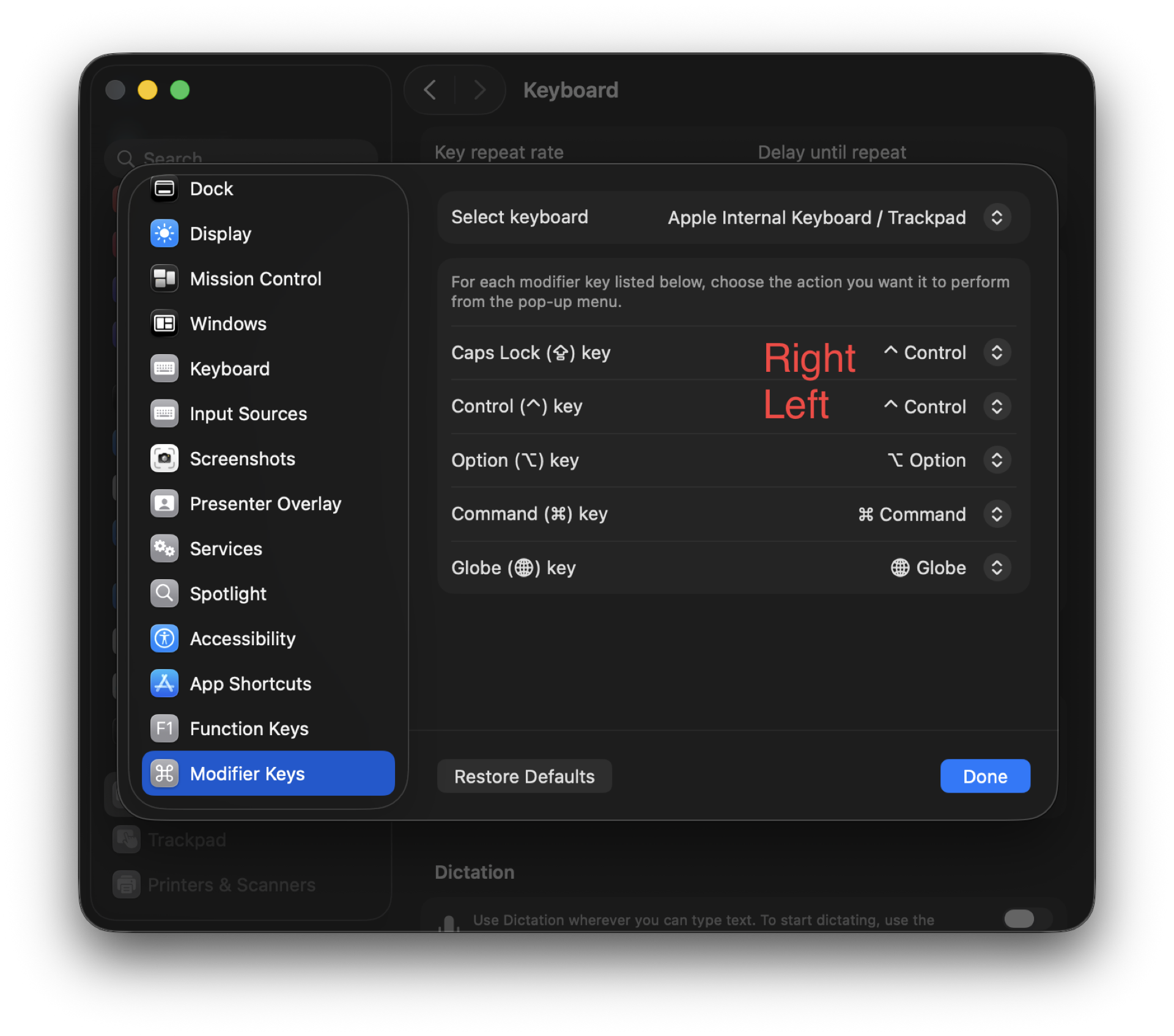
I'm using Handy.app (cjpais/Handy) for text-to-speech and hold-to-speak functionality. Which button to use? Right Option rarely used, but I do use it as Hyper key in Emacs, in particular {H-RET} calls visit-source (visit-source.el).

Right Control also rarely used and does exists on my Keyboardio Model 100. But, it turned out macOS remaps CapsLock to Right Control from the SystemSettings.app.

260804--keyboard-remapping__macos.png

I need some remapping then, for internal keyboard only:

  • CapsLock to Left Control
  • Left Control to Right Control

To achieve that, store the plist to ~/Library/LaunchAgents/com.local.keyboard-remap.plist file.

To rebind live without reboot, run hidutil commands manually. In SystemSettings.app set default CapsLock binding (CapsLock to CapsLock).

<?xml version="1.0" encoding="UTF-8"?>
<!DOCTYPE plist PUBLIC "-//Apple//DTD PLIST 1.0//EN"
  "http://www.apple.com/DTDs/PropertyList-1.0.dtd">
<plist version="1.0">
<dict>
  <key>Label</key>
  <string>com.local.keyboard-remap</string>
  <key>ProgramArguments</key>
  <array>
    <string>/bin/sh</string>
    <string>-c</string>
    <string>
      /usr/bin/hidutil property --set '{"UserKeyMapping":[{"HIDKeyboardModifierMappingSrc":0x700000039,"HIDKeyboardModifierMappingDst":0x7000000E0}]}';
      /usr/bin/hidutil property --matching '{"VendorID":0x0,"ProductID":0x0}' --set '{"UserKeyMapping":[{"HIDKeyboardModifierMappingSrc":0x700000039,"HIDKeyboardModifierMappingDst":0x7000000E0},{"HIDKeyboardModifierMappingSrc":0x7000000E0,"HIDKeyboardModifierMappingDst":0x7000000E4}]}'
    </string>
  </array>
  <key>RunAtLoad</key>
  <true/>
</dict>
</plist>

It's been a while…

I haven't published a public note in July. Not that I haven't written anything, far from that. Just didn't publish.

Okay, some updates:

Add buffer name autocomplete to cape

I use cape.el to manage specific completion-at-point functions. The most used ones for me are {C-c t f} - complete file name and {C-c t s} - complete Elisp symbol.

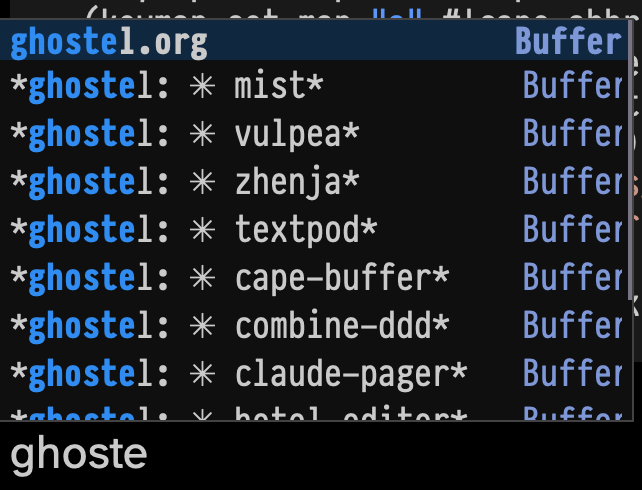
After starting using ghostel with Claude Code being able to complete the buffer name became more desirable than ever, so I can quickly drop into notes things like this:

  • (vux-ghostel-buffer "cape-buffer")

Asked Claude, it wrote "cape-buffer-name" function, bound to {C-c t b}. Works!

(defun cape-buffer-name ()
  "Completion-at-point function for open buffer names."
  (let ((bounds (or (bounds-of-thing-at-point 'symbol)
                    (cons (point) (point)))))
    (list (car bounds) (cdr bounds)
          (completion-table-dynamic
           (lambda (_) (mapcar #'buffer-name (buffer-list))))
          :exclusive 'no
          :annotation-function (lambda (_) " Buffer"))))

(use-package cape
  :after (tempo)
  :config
  (setq cape-elisp-symbol-wrapper '())
  (setq cape-keymap (make-sparse-keymap))
  (let ((map cape-keymap))
    (keymap-set map "<tab>" #'completion-at-point)
    (keymap-set map "b" (lambda () (interactive)
                          (cape-interactive #'cape-buffer-name)))
    ;; (keymap-set map "t" #'complete-tag)
    (keymap-set map "t" #'tempo-complete-tag)
    (keymap-set map "d" #'cape-dabbrev)
    (keymap-set map "f" #'cape-file) ;; using often
    (keymap-set map "k" #'cape-keyword)
    (keymap-set map "s" #'cape-elisp-symbol) ;; using often
    (keymap-set map "a" #'cape-abbrev)
    (keymap-set map "l" #'cape-line)
    (keymap-set map "w" #'cape-dict)
    (keymap-set map "_" #'cape-tex)
    ;; (keymap-set map "&" #'cape-sgml)
    ;; (keymap-set map "r" #'cape-rfc1345)
    t)
  (keymap-global-set "C-c t" cape-keymap))

Screenshot:

260630--cape-complete-buffer__emacs_screenshot.png

Create Graphviz graph out of a picture

I was cleaning my screenshots directory and spotted one from the "Wisey" service that teaches you mindfullness and habits. I didn't go to subscribe to the service but I did save the screenshot.

I asked Claude Code: I want Graphviz graph that looks as close as possible to this file:

260629--morning-routine-wisey__screenshot.png

And here's the result I got in a minute:

(vux-ghostel-buffer "graphviz-morning-routine")
260629--morning-routine__graphviz.png

Not bad, huh?

claude-pager

On <2026-06-03 Wed> I somehow bumped into idea to use emacsclient as EDITOR in Claude Code.

Turns out CC respects EDITOR env variable, either from environment or configured in ~/.claude/settings.json:

{"env": {"EDITOR": "emacsclient", "VISUAL": "emacsclient"}}

Even if [Feature Request] Allow configuring external editor for Ctrl-G prompt editing · Issue #18990 · anthropics/claude-code is still in open.

In that issue I spotted this project: gradigit/claude-pager. Fast C transcript pager for Claude Code: no blank Ctrl-G screen, clickable links/files, queued prompt composer. And its sister editor: gradigit/turbodraft.

Tried both. Turbodraft - I don't need another text editor rather than Emacs, so skipping it. But claude-pager looks useful, so I forked it.

First, I wired Emacs into claude-pager; so that it renders transcripts in both CC screen when it waits for the prompt + adds it to Emacs temporary buffer.

This mostly solves clunkiness of copying from claude terminal into Emacs and back - now I press {C-g} in claude and continue editing in Emacs.

Related to Agent SDK billing and parting ways with agent-shell.

This is how my env block looks like in ~/.claude/settings.json.

{
  "env": {
    "EDITOR": "/Users/pavel/.velppa/claude-pager/bin/claude-pager-open",
    "CLAUDE_PAGER_EDITOR": "/Users/pavel/.velppa/claude-pager/emacs/claude-emacs-prompt",
    "CLAUDE_PAGER_EDITOR_TYPE": "gui"
  }
}

{C-g} in claude opens claude-pager-open that generates transcript and pastes it into both terminal and to the temp file to edit in Emacs, then runs claude-emacs-prompt shell file that calls elisp file which loads into the buffer, assigns keybindings etc.

Setup involves adding hooks:

SessionStart hook:
     26:            "command": "/Users/pavel/.velppa/claude-pager/shim/save-session-transcript.sh"

Then I rewrote the binary from C to Zig. Rewrite used Superpowers to develop a spec first, then launch a series of agents. It took 4+ hours for CC to finish rewrite, it was ready in the morning. It used all extra usage (42 EUR) in fast mode in first 20 minutes.

7000 loc in C => ??? in Zig.

Now I understand the C well.

Another interesting project from the same author:

  • gradigit/confetti - Lightweight confetti animation for macOS — fire colorful confetti from your screen corners

Copy buffer-name with easy-kill

easy-kill Emacs package allows killing multiple things, switching between them on the fly. I use it to quickly grab the buffer-file-name (full path or file name only), using {M-w b}.
github
leoliu/easy-kill

Keybindings:

{M-w} without active region
copy current line, same as {x y} in meow-normal-mode
{M-w C-w} without active region
kill current line, same as {x s} in meow-normal-mode
{M-w b}
copy current full path to buffer-file-name
{M-w b 0}
copy current buffer-file-name
{M-w b -}
copy current directory

On <2026-06-04 Thu> I added {M-w B} to copy current buffer-name, useful to paste into Claude Code (running under ghostel for me).

Here's the configuration block:

(use-package easy-kill
  :config
  (keymap-global-set "<remap> <kill-ring-save>" #'easy-kill)
  (defun easy-kill-on-buffer-name (_n)
    "Get current `buffer-name'."
    (if (easy-kill-get mark)
        (easy-kill-echo "Not supported in `easy-mark'")
      (easy-kill-adjust-candidate 'buffer-name (buffer-name))))
  (add-to-list 'easy-kill-alist '(?B buffer-name)))
  1. Define function easy-kill-on-buffer-name.
  2. Add binding to 'easy-kill-alist.