Search / 31 matching notes

Notes &
other things.

2026

My agentic workflow

I plan to put all this packages into a separate repo. For now they are linked in this post directly, use as (require 'name).
My agentic workflow

I plan to put all this packages into a separate repo. For now they are linked in this post directly, use as (require 'name).

As of October 2026 I no longer write code by hand. My flow is to steer AI agents from and within Emacs to let them autonomously work on projects. As the moment of writing, my Emacs steers 25 sessions of Claude Code (95% sessions), OpenCode (running Astra) and Pi (running Astra) over two Mac machines.

Sessions are not sticky and I'm trying to start every week fresh. They store their progress in Org Mode notes (via sexps using Org API, not manual file editing).

My setup: I mostly use two Macs - (i) Mac Mini - always on homeserver (ii) MacBook Pro - working machine that I carry with me. Syncthing syncs work files between them and iCloud for personal documents.

I use several orthogonal ideas.

Vulpea (Org Roam) for Notes

I've been using Org Roam for 5 years now. I always kept notes in ~/Notes and ~/WorkNotes and had .dir-locals to support multiple root directories. Then I found d12frosted/vulpea which natively supports multiple top-level directories, and it clicked - now I can keep my (human-written) notes separately from AI-written notes, but they link between each other via IDs.

I also often move/rename files and having stable ID is a must for me; so Denote doesn't fit my workflow (I keep denotef.el btw to rename auxiliary files).

select 'notes' tbl, count(*) from notes union all
select 'files', count(*) from files union all
select 'links', count(*) from links union all
select 'properties', count(*) from properties;
tbl count(*)
notes 3324
files 2446
links 39654
properties 5248
Emacs runs ghostel that runs agent that calls Emacs

Emacs runs ghostel that runs CLI agent that calls Emacs via emacsclient. AI is good at Elisp and it can execute arbitrary Elisp code in the running Emacs instance to change in while it running.

Excerpt from CLAUDE.md
* Emacs
Emacs configuration directory is ~/.config/emacs.  I use self-built
emacs-mac binary with native compilation support, not emacs-plus.

Whenever you see inline sexp, it's an Emacs elisp expressions.  Use
=emacsclient-eval= to evaluate elisp expressions, passing via heredoc
syntax or stdin to avoid quote escaping.  The result will be either
direct output or a file name (for long output).  Do NOT use raw
=emacsclient=.  Do NOT use HotterEmacs unless explicitly asked -
HotterEmacs is a remote Emacs instance.

#+begin_example sh
emacsclient-eval <<'ELISP'
(+ 1 2)
ELISP
#+end_example

Never update user notes - ~/Notes and ~/WorkNotes directories - on your
own unless explicitly asked by the user.

Org Mode links like =id:<id>= or =ID:<id>= are Vulpea notes.  If you need
to get note details use (vulpea-ux-get-note "<id>"), that returns
plist with keys :body - raw text, and :note - (describe-symbol 'vulpea-note)
struct.

When prompt contains (◊doc 'TERM), evaluate it and treat its output as
public API documentation.  Learn documented functions and variables for
subsequent requests.  Do not reproduce, summarize, or acknowledge
output unless explicitly asked.  Use documented APIs directly; do not
load a skill when documentation is sufficient.

When prompt contains a TODO org heading (statuses TODO or DOING), it
means you are asked to do / continue the task.  If multiple TODO
headings - use subagents to execute them in parallel.  If heading
contains a tag matching agent name - use that agent.

If text contains an elisp sexp with non-standard function - it's a
helper, usually name is self-explainatory.  If in doubt, what sexp
does, use ◊doc helper, example: (◊doc '◊grep).

Whenever you bring anything for the user, it MUST be in the form of
sexp that will bring the user there directly.  Most commonly used are
◊ff and ◊github-status, check (◊doc 'lozenge) for others.

Ghostel runs agent directly, not start ghostel, cd into dir, then run claude but {M-x agent-start-claude-code}1.

Ghostel APIs - namely ghostel-send-(key|string) - give agents capability to talk to each other as if it was user typing into their terminal. To read what another session is doing it's reading the buffer string.

Tip: at any session I can mention the buffer by name and ask Claude to do something about it, like "Figure out *Warnings* buffer and fix them in my config".

Gotcha 2: when Emacs hangs I open claude in Terminal and say "why Emacs hung, fix it" or "Emacs is slow, fix it". I know about "kill -USR2", but Claude is doing it much better, often sending direct syscalls to alter the running process.

emacsclient-eval wrapper

emacsclient --eval works quite well unless output is big, then it starts chunking. To prevent that I wrote emacsclient-eval wrapper. Initially it was just always sending output into temporary file from within emacs, then at the shell counted the size, and if it's 8KB or less then cat it, otherwise return the full file name.

But then I realised that it's a good place to add save-excursion so that Claude can run file-based sexps or open windows or basically any sexp and my current point and windows stay intact.

Then I needed to inject the Claude process id into the sexp (more on that later), and emacsclient-eval also helped.

It's also a good place to add filtering, hooks, Jev for security assessment etc.

Start agents with agent.el

agent.el is a small package wrapping agent launchers that I use for adhoc sessions.

They exist to quickly launch an agent without first jumping into ghostel, then to shell and manually type. My drivers are {M-x agent-start-claude-code}, {M-x agent-start-pi}, {M-x agent-start-opencode}.

Also {M-x agent-copy-path-spec} - very handy - select a region and copy path spec for the agent to pinpoint the region to read.

Don't write skills, give API with (◊doc 'feature)

Enter lozenge.el. Another idea is to instead of writing skills, give agent a public API it can read and call. I have a plenty of packages for services, and ◊doc macro that returns feature doc strings so Agent reads it and calls it.

Instead of writing a skill to work with Slack, I say "read (◊doc 'slack)"; or (◊doc 'datadog) or (◊doc 'snowflake). My butler (later) skill is literally "You are the butler, read (◊doc 'butler) and catch up".

◊doc also works for ordinary functions.

output of (◊doc 'lozenge)
"== Entry point ==

Command: (◊insert-sexp)
Insert ◊ sexp and complete the command that follows it.

Command: (◊insert-lozenge)
Insert ◊ symbol.

Variable: ◊eval-look-back-lines
How many lines above point ◊eval scans for the start of a sexp.

Command: (◊eval &optional replace)
Evaluate the outermost sexp around point and echo its value.
With REPLACE (C-u), replace the sexp with its value instead,
as ‘◊eval-and-replace’ does.

Works in any major mode, so a sexp written in a note runs where it
is written.

Command: (◊eval-and-replace)
Evaluate the outermost sexp around point and replace it with its value.

A string value goes in as its text, any other value as Lisp would
print it.  A sexp run for its effect gives no output - nil, or an
object that does not print readably, like the process ‘browse-url’
starts - so it stays, as it does when evaluation fails.

== Documentation ==

Command: (◊doc thing)
Return documentation for THING.
When THING is a loadable feature (something ‘require’ can find), this
returns its public functions, variables, and struct types, sectioned
by the ‘;;;’ headings of the file that defines them - see
‘◊--doc-feature’.  Otherwise THING must already be a bound function,
variable, or ‘cl-defstruct’ type, and its own documentation is
returned alone - see ‘◊--doc-symbol’.

Output is plain text: signature or variable/struct name, then its
doc-string.

Interactively, prompt for THING, offering the symbol at point, and
browse it shortdoc-style in a *doc-THING* buffer: one entry per
symbol with a button to its full description, ‘n’ and ‘p’ between
entries, ‘N’ and ‘P’ between sections.

== Buffers ==

Command: (◊copy-buffer-name)
Copy the current buffer name to the kill ring.

Function: (◊ghostel-buffer session-name)
Switch to the ghostel buffer running the SESSION-NAME session.

== The web ==

Command: (◊github-search term &rest --cl-rest--)
Search GitHub code for TERM, narrowed to ORG and REPO.

Command: (◊github-repo repo &rest --cl-rest--)
Open REPO on GitHub.
REPO may be a bare name or ORG/REPO; a bare name is qualified
with ORG.

Command: (◊shortcut-story story)
Open the Shortcut STORY, given as an id, sc-id or [id].

Command: (◊shortcut-epic epic)
Open the Shortcut EPIC, given as an id, sc-id or [id].

Command: (◊duckduckgo term)
Search DuckDuckGo for TERM.

Command: (◊google term)
Search Google for TERM.

Function: (◊curl url &rest rest)
Request URL with ‘plz-see’, adding auth headers for the host.
METHOD defaults to ‘get’.  Headers passed explicitly win over the
auth-source ones.  NAME names the response buffer, replacing any
buffer of that name; it then takes only AS ‘buffer’, and THEN and
ELSE receive the renamed buffer.

== Git ==

Command: (◊show-commit repo ref)
Show commit REF of REPO in Magit.

Command: (◊git-status repo)
Show Magit status of REPO, a directory or a repository name symbol.

== Searching ==

Command: (◊grep repo term)
Grep REPO for the string TERM with ‘deadgrep’.

REPO is repository name (symbol or string), searched across
‘◊repo-roots’, not a full path.  TERM is a string to search for.

Command: (◊grep-re repo term)
Grep REPO for the regexp TERM with ‘deadgrep’.

REPO is repository name (symbol or string), searched across
‘◊repo-roots’, not a full path.  TERM is a string to search for.

Command: (◊grep-notes term)
Grep the work notes for the string TERM.

Function: (◊ack-rx expr &optional directory)
Run ‘ack’ in DIRECTORY for EXPR, an ‘rx’ form.

== Files ==

Command: (◊find-file repo pattern)
Open the first file matching PATTERN in REPO.
PATTERN may carry a trailing :LINE or :LINE:COL, and point lands
there.  REPO is looked up across ‘◊repo-roots’.

Function: (◊read repo pattern)
Return the contents of the first file matching PATTERN in REPO.
REPO is looked up across ‘◊repo-roots’; nil means PATTERN is a path.
A trailing :LINE reads from that one-based line through end of file.
An optional :COL after :LINE is ignored.  Read from disk without
visiting the file.

Command: (◊elpa-find-file pattern)
Open the file matching PATTERN in the elpa directory.
PATTERN may carry a trailing :LINE or :LINE:COL.  Error when two
versions of the same package match - the stale one has to go.

Command: (◊recover-all-files &optional dir)
Run ‘recover-file’ for every file in DIR that has auto-save data.
DIR defaults to ‘default-directory’.  Candidates are found from
their auto-save files (#name#); ‘recover-file’ prompts per file.

== Other ==

Variable: plz-see-base-url
Prefix to add to the URL argument of ‘plz-see’, if relative.
Relative here means, paradoxically, that the URL in question
starts with \"/\".

Variable: ◊repo-roots
Alist of roots under which a repository is looked up by name.
Each value is a directory holding repository subdirectories; the
first root containing the repository wins.

Variable: ◊doc-section-order
How ‘◊doc’ orders a feature’s sections.
‘reverse’ puts the last section of the source file first: a Lisp file
defines primitives before the things that use them, so reading it
backwards leads with what a caller wants.  ‘source’ keeps the file’s
order.  Either way an explicit order set with (put FEATURE
=’◊doc-sections =’(SECTION ...)) is honoured first, and Other
comes last.

Variable: ◊github-org
GitHub organisation assumed when a repository is named bare.

"

Lozenge is this symbol - ◊. I saw it in the Pollen publishing system by Matthew Butterick. My lozenge.el has nothing to do with Pollen except all symbols there start with ◊. This gives me a separate namespace for functions that (i) guaranteed to having no symbol collissions (ii) looks like some strange markup that I can copy-paste directly into Slack, like (◊github-search "MakePayment"). I have {C-c l l} to insert (◊) and open completing-read with the symbols, and {C-c l i} to insert ◊ symbol.

I force Claude to write using sexps, so that I can put point on them and execute with ◊eval {C-c l e}.

Here's the example output of a session, {C-c C-t} then put point inside sexp then {C-c l e}.

The Migrate Batch Jobs to k8s session is open. Squad-Projects.org
didn't change, since the heading already had a monkey-id.

(switch-to-buffer "*claude: migrate-batch-jobs-to-k8s*")

Another handy examples - you can figure out what they do:

  • (◊git-status "~/.wt/proxy_remove-ecs-iac")
  • (◊ff 'metadata-registry "Export/v1/schema.json")
  • (◊github-search "cross_account_invoke_lambda")
  • (◊grep 'repo-name "cio.trackEvent")
  • (◊duckduckgo "github actions changed files")
monkey.el - flowchart-based execution

TL;DR: most typing into the claude terminal is literally this:

start monkey worker (buffer-local monkey-session-id carries ID and then the skill figures everything by looking at backlinks)

adopt monkey session for project (it derives the project from the current session name)

continue on the next :todo from monkey-task-context

monkey repo is private as it contains work details, if anybody interested I'll open it.

I'm running sessions that span weeks. No, they don't work 24/7 nor I'm token-maxxing. Session keeps track of a project, a significant feature, operational work for the week etc.

monkey.el is to:

  1. Keep user notes (Org Mode heading, TASK in monkey.el terminology) - in ~/Notes or ~/WorkNotes - separate from agent notes (Org Mode file in ~/Sync/Monkey, NOTE). Agent only writes to NOTE and reads from TASK.
  2. Add the place for Agent to break down work into ITEMS (Org Mode headings with their TODO status). It's like Plan mode, but I stopped it in favour of "here's TODOs, go do them and write results here".
  3. Ensure execution follows the flowchart. The flowchart itself uses monkey notation. I used graphviz, but switched to reladraw (my fork with diamond shapes).
  4. Ensure that agent writes to Org using sexps, adds metadata so I can quickly check what's going on.

NOTE is a separate Org file, lives under ~/Sync/Monkey that are under vulpea-db-sync-directories.

monkey.el is accompanied with Monkey-Worker.org skill that explains writing preferences, teaches notation, instructs with using flowcharts.

Monkey predates lozenge.el so I still didn't move the skill to "read (◊doc 'monkey) and act".

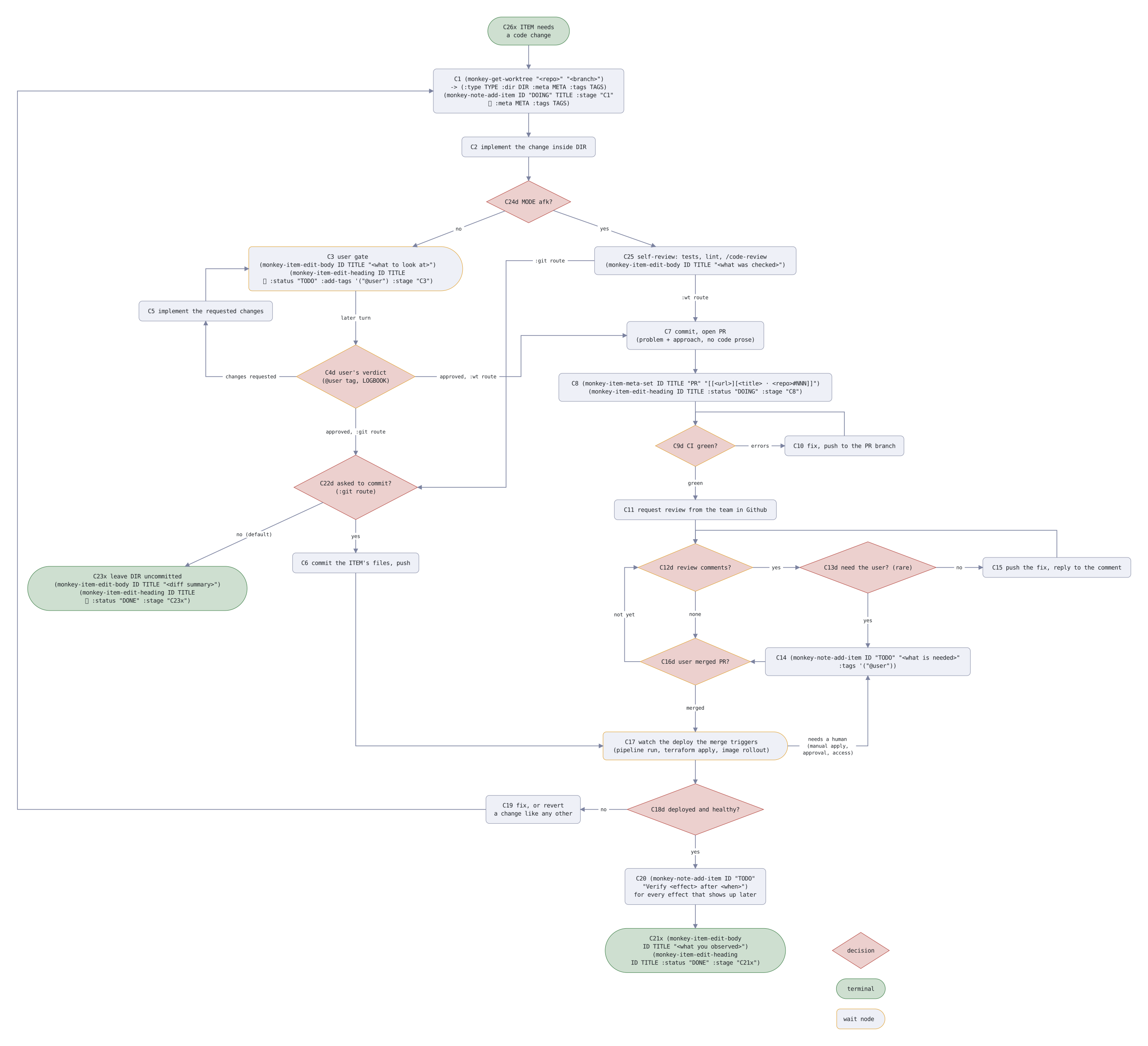
Example of flowchart - agent reads source code, I look at the graph representation. Every node has immutable code encoding node type and flowchart itself (C26x - Change Handling, x - terminal).

change handling flowchart
style decision  shape: diamond  fill: theme-secondary-subtle  border: theme-secondary
style terminal  shape: pill  fill: theme-primary-subtle  border: theme-primary
style wait      border: #e0a030
style key       text: (size: small, color: theme-muted)

default edge  text: (size: small)

node C26x "C26x ITEM needs / a code change"  style: terminal
node C1  "C1 (monkey-get-worktree \"<repo>\" \"<branch>\") / -> (:type TYPE :dir DIR :meta META :tags TAGS) / (monkey-note-add-item ID \"DOING\" TITLE :stage \"C1\" / ​  :meta META :tags TAGS)"  below C26x
node C2  "C2 implement the change inside DIR"  below C1
node C24d "C24d MODE afk?"  below C2  style: decision
node C3  "C3 user gate / (monkey-item-edit-body ID TITLE \"<what to look at>\") / (monkey-item-edit-heading ID TITLE / ​  :status \"TODO\" :add-tags '(\"@user\") :stage \"C3\")"  below-left of C24d  style: wait  shape: half-pill
node C25 "C25 self-review: tests, lint, \/code-review / (monkey-item-edit-body ID TITLE \"<what was checked>\")"  below-right of C24d
node C4d "C4d user's verdict / (@user tag, LOGBOOK)"  below C3  style: decision and wait
node C5  "C5 implement the requested changes"  above-left of C4d
node C22d "C22d asked to commit? / (:git route)"  below C4d (gap: wide)  style: decision
node C23x "C23x leave DIR uncommitted / (monkey-item-edit-body ID TITLE \"<diff summary>\") / (monkey-item-edit-heading ID TITLE / ​  :status \"DONE\" :stage \"C23x\")"  below-left of C22d (gap: wide)  style: terminal
node C6  "C6 commit the ITEM's files, push"  below C22d
node C17 "C17 watch the deploy the merge triggers / (pipeline run, terraform apply, image rollout)"  below C16d (gap: wide)  style: wait  shape: half-pill
node C18d "C18d deployed and healthy?"  below C17  style: decision
node C19 "C19 fix, or revert / a change like any other"  left of C18d (gap: wide)
node C20 "C20 (monkey-note-add-item ID \"TODO\" / \"Verify <effect> after <when>\") / for every effect that shows up later"  below C18d
node C21x "C21x (monkey-item-edit-body / ID TITLE \"<what you observed>\") / (monkey-item-edit-heading / ID TITLE :status \"DONE\" :stage \"C21x\")"  below C20  style: terminal

node C7  "C7 commit, open PR / (problem + approach, no code prose)"  below C25 (gap: wide)
node C8  "C8 (monkey-item-meta-set ID TITLE \"PR\" \"\[\[<url>]\[<title> ⋅ <repo>#NNN]]\") / (monkey-item-edit-heading ID TITLE :status \"DOING\" :stage \"C8\")"  below C7
node C9d "C9d CI green?"  below C8  style: decision and wait
node C10 "C10 fix, push to the PR branch"  right of C9d (gap: wide)
node C11 "C11 request review from the team in Github"  below C9d
node C12d "C12d review comments?"  below C11  style: decision and wait
node C13d "C13d need the user? (rare)"  right of C12d (gap: wide)  style: decision
node C15 "C15 push the fix, reply to the comment"  right of C13d (gap: wide)
node C14 "C14 (monkey-note-add-item ID \"TODO\" \"<what is needed>\" / :tags '(\"@user\"))"  below C13d (gap: wide)  level with C16d
node C16d "C16d user merged PR?"  below C12d (gap: wide)  style: decision and wait

edge C26x -> C1
edge C1 -> C2
edge C2 -> C24d
edge C24d -> C3 "no"
edge C24d -> C25 "yes"
edge C25 -> C22d ":git route"  from: left  to: right  line: (path: square)
edge C25 -> C7 ":wt route"  from: bottom  to: top
edge C3 -> C4d "later turn"
edge C4d -> C5 "changes requested"  from: left  to: bottom  line: (path: square)
edge C5 -> C3  from: top  to: left  line: (path: square)
edge C4d -> C22d "approved, :git route"
edge C4d -> C7 "approved, :wt route"  from: right  to: left  line: (path: square)
edge C22d -> C6 "yes"
edge C22d -> C23x "no (default)"
edge C6 -> C17  from: bottom  to: left  line: (path: square)
edge C7 -> C8
edge C8 -> C9d
edge C9d -> C10 "errors"
edge C10 -> C9d  from: top  to: top  line: (path: square)
edge C9d -> C11 "green"
edge C11 -> C12d
edge C12d -> C13d "yes"
edge C12d -> C16d "none"  from: bottom  to: top
edge C13d -> C14 "yes"
edge C13d -> C15 "no"
edge C15 -> C12d  from: top  to: top  line: (path: square)
edge C14 -> C16d  from: left  to: right
edge C16d -> C12d "not yet"  from: left  to: left  line: (path: square)
edge C16d -> C17 "merged"  from: bottom  to: top
edge C17 -> C14 "needs a human / (manual apply, / approval, access)"  from: right  to: bottom  line: (path: square)
edge C17 -> C18d
edge C18d -> C19 "no"
edge C19 -> C1  from: left  to: left  line: (path: square)  left of C23x
edge C18d -> C20 "yes"
edge C20 -> C21x

node key_d "decision"  right of C21x (gap: wide)  style: decision
node key_x "terminal"  below key_d (gap: tight)  style: terminal
node key_w "wait node"  below key_x (gap: tight)  style: wait  shape: half-pill
monkey-pr__flow.svg

Using Monkey is like this:

  • Write an Org Mode heading, add metadata (repo, project), run {M-x monkey-jack-in}, then in a session say "start monkey worker".
  • Start a session (I do this from emacs-web, later), rename it after the project with "/rename project", then say "adopt monkey session".

Here's the literal content of the skill, based on ID claude reads the actual Org mode file using vulpea.

---
name: monkey-worker
description: work a Monkey TASK session in dwim fashion - "start" begins the NOTE's ITEMs, "continue" folds new TASK TODOs into the NOTE and resumes, "adopt" turns the current session into a monkey session. Use when the session has a Monkey NOTE ID (buffer monkey-session-id or session name) and the user says "start", "continue", or gives no direction, or when the user says "work here as a monkey".
---

Load the /orgmode skill first - everything written into a NOTE is Org
Mode and follows its constructs.

Read [Monkey Worker skill](id:20260716T113128.723996).
emacs-web.el

Okay, we're close to butler, the one that we're here for.

But before - emacs-web.el - a web UI to manage Emacs. It all started when I went walking acrosss the lake with my son and wanted to have mobile client for OpenCode. I asked Claude (remote) - "build me a web app with listing of Emacs buffers in Notes.app UI style". By the end of the walk I had buffers, pins, killing buffer, rendering (htmlize does this), typing into Claude, and even voice input using Whisper with custom prompt.

I'm using it now all the time, it has (i) two my Macs connecting to it (two Emacs instances); (ii) sharing buffers, so some of the Claude sessions I share with my wife - they manage her Shopify shop; (iii) voice input for memos that go into daily note.

Here's the minimal running config, after putting emacs-web.el into your load-path:

(use-package emacs-web :ensure nil
  :config (emacs-web-start))

if something's off, ask Claude to fix it.

Then you need to bring http://localhost:4678 to Internet, e.g. Cloudflare Tunnels:

cloudflared tunnel --url http://localhost:4678
my config with two machines
(use-package emacs-web :ensure nil
  :config
  (defun v/emacs-web-claude-in-notes ()
    "Start a Claude Code session in the Notes, named after the time."
    (agent-start-claude-code "~/Notes/" (format-time-string "notes-%H%M")))
  (defun v/emacs-web-opencode-in-notes ()
    "Start a OpenCode session in the Notes, named after the time."
    (agent-start-opencode "~/Notes/" (format-time-string "notes-%H%M")))
  (defun v/emacs-web-pi-in-notes ()
    "Start a Pi session in the Notes, named after the time."
    (agent-start-pi "~/Notes/" (format-time-string "notes-%H%M")))
  (defun v/emacs-web-butler-in-notes ()
    "Start the butler in the Notes, named after the time: a Claude Code
session that catches up on the other sessions every 15 minutes."
    (let ((buffer (agent-start-claude-code "~/Notes/" (format-time-string "butler %H%M"))))
      (agent-type buffer '("Load (◊doc 'butler) and act as butler"
                           "/loop 15m catch up"))
      buffer))
  (setq emacs-web-claude-resume-function
        (lambda (dir id name) (agent-start-claude-code dir name id)))
  (defun v/memo-after-send (start)
    "Tidy the text sent from the phone from START: drop the tag dictation
starts it with, fill it to the phone's width, leave a blank line
after it, and save."
    (save-excursion
      (goto-char start)
      (when (looking-at (regexp-quote "[voice input] "))
        (delete-region (match-beginning 0) (match-end 0))))
    (let ((end (point-marker))
          (fill-column (or emacs-web-sent-columns fill-column)))
      (fill-region start end)
      (goto-char end)
      (set-marker end nil))
    (insert "\n")
    (let ((delete-trailing-lines nil))
      (save-buffer)))
  (defun v/emacs-web-new-memo ()
    "Start a Memo heading at the end of today's daily note, point under it,
and save the note.  Dictation sent to it from the phone goes in
without its tag, followed by a blank line, and is saved."
    (vulpea-dailies-goto-today)
    (add-hook 'emacs-web-after-send-functions #'v/memo-after-send nil t)
    (goto-char (point-max))
    (unless (bolp) (insert "\n"))
    (insert (format-time-string "\n* Memo %H:%M\n"))
    (let ((delete-trailing-lines nil))
      (save-buffer))
    (dolist (window (get-buffer-window-list nil nil t))
      (set-window-point window (point)))
    (current-buffer))
  ;;
  (pcase (system-name)
    ("mini"
     (setq emacs-web-title "Mac mini"
           emacs-web-computers '(("Mac mini" . "./") ("M4 Pro" . "pro/"))
           ;; the shared buffers alone, for jozh.nl/pix-n-art
           emacs-web-shared-port 4680)
     (setq emacs-web-list-actions
           '(("New Claude Code session in Notes" . v/emacs-web-claude-in-notes)
             ("New OpenCode session in Notes" . v/emacs-web-opencode-in-notes)
             ("New Pi session in Notes" . v/emacs-web-pi-in-notes)
             ("New Butler" . v/emacs-web-butler-in-notes)
             ("Resume Claude session" . emacs-web-claude-resume-session)
             ("New memo" . v/emacs-web-new-memo))))
    ("m4pro"
     (defun v/emacs-web-claude-in-worknotes ()
       "Start a Claude Code session in the WorkNotes, named after the time."
       (agent-start-claude-code "~/WorkNotes/" (format-time-string "worknotes-%H%M")))
     (setq emacs-web-title "M4 Pro"
           emacs-web-computers '(("Mac mini" . "../") ("M4 Pro" . "./"))
           ;; the Mini's Whisper hears dictation for both
           emacs-web-transcribe-at "../")
     (setq emacs-web-list-actions
           '(("New Claude Code session in Notes" . v/emacs-web-claude-in-notes)
             ("New Claude Code session in WorkNotes" . v/emacs-web-claude-in-worknotes)
             ("New OpenCode session in Notes" . v/emacs-web-opencode-in-notes)
             ("New Pi session in Notes" . v/emacs-web-pi-in-notes)
             ("New Butler" . v/emacs-web-butler-in-notes)
             ("Resume Claude session" . emacs-web-claude-resume-session)
             ("New memo" . v/emacs-web-new-memo)))))
  ;;
  (emacs-web-start))
butler.el

Butler is a Claude session stat steers other ghostel sessions across both of Macs.

Butler started with these instructions:

you're a butler, load (◊doc 'butler) and catch up every 30 minutes

It knows ghostel sessions by listing buffers in Emacs, then goes to each session and types there:

Report briefly: what you delivered in this session, what is left unfinished, and what needs my decision.

After Butler collected status, it decomposes status into asks for the user, giving each ask a sequential ID and places them into the ring, so user (me) always presented with a single action, stating the ID, it's type (D - Decision, B - Blocked, U - User action needed), session name and details.

Pager
github
velppa/claude-pager

Claude, OpenCode and Pi are configured with EDITOR=emacs-pager, so typing {C-g} opens a new Emacs buffer where I can type an answer, press {C-c C-c} to confirm or {C-c C-k} to abort. For Claude, the buffer also contains the session transcript with tool calls converted into Org syntax, tables are arranged etc.

Pager closes the gap of navigating and working with the session transcript as a real buffer. Ghostel' modes are great, but they are still behind ordinary buffer.

Tip: use org-store-link (I bound it at {C-c n L} and then in the prompt buffer org-insert-link, {C-c n I} to insert the pointer for agent to check/act on.

emate.el

Emate is an Elisp implementation of kunchenguid/firstmate that uses Emacs/ghostel instead of tmux/Bash for steering. I also removed all the bluff of "adress user as a Captain".

I used it for a week and then switched back to Monkey Workers + Butler steering.

Auxiliary stuff - reload.el, Monkey Kanban, Stepper

There are some helper packages for my use case - using two Macs.

  • refresh.el - automatically reloads the package when it was changed. Helpful when a session on Mini changes the package and Emacs on MBP picks it up.
  • Monkey Kanban is a Go app that renders Monkey sessions on a Kanban board. Links open Emacs using org-protocol.
  • Stepper is my implementation of AWS StepFunctions - replacement for Claude Routines and Datadog Synthetics. Whenever I want to run AI on schedule, I create a StepFunction.

    Examples:

    • credentials updaters (login into SSO every few hours)
    • proactive service monitoring (runs a skill that checks metrics and logs in Datadog and Kubernetes)
    • handling Datadog Cases (I even had instruction "whenever new case arrived, start a monkey session with the fix" - and observed PRs opened, with humans as bottleneck, so disabled it for now)
    • monitoring YouTube and generate summaries.
    • summaries for changed tickets in the past working day in Shortcut (like Jira).
gptel

I was using gptel heavily before Claude Code became so useful. I still have {C-c j} prefix for gptel actions, but using it less and less these days. Some useful functions that I have:

  • v/gptel-summarize-buffer
  • v/gptel-generate-commit-message
  1. In simplest form agent-start-claude-code is this:
    (defun agent-start-claude (name)
      "Start Claude Code session named NAME in `default-directory'."
      (interactive "sName: ")
      (let ((buf (get-buffer-create (format "*claude: %s*" name))))
        (ghostel-exec buf "claude" (list "--remote-control" "--name" name))
        (switch-to-buffer buf)))
    
    ↩

Using reladraw with Org Mode

Reladraw (github) is a new declarative diagramming package that allows manually specify node position (relative). With Graphviz it's always a pita with specifying invisible links t…

Using reladraw with Org Mode

monkey-id
Using reladraw with Org Mode

Reladraw (github) is a new declarative diagramming package that allows manually specify node position (relative). With Graphviz it's always a pita with specifying invisible links to achieve similar.

So on <2026-10-06 Tue> I asked CC to build ob-reladraw.el so I can use from Org Mode.

Let's try some examples.

Examples

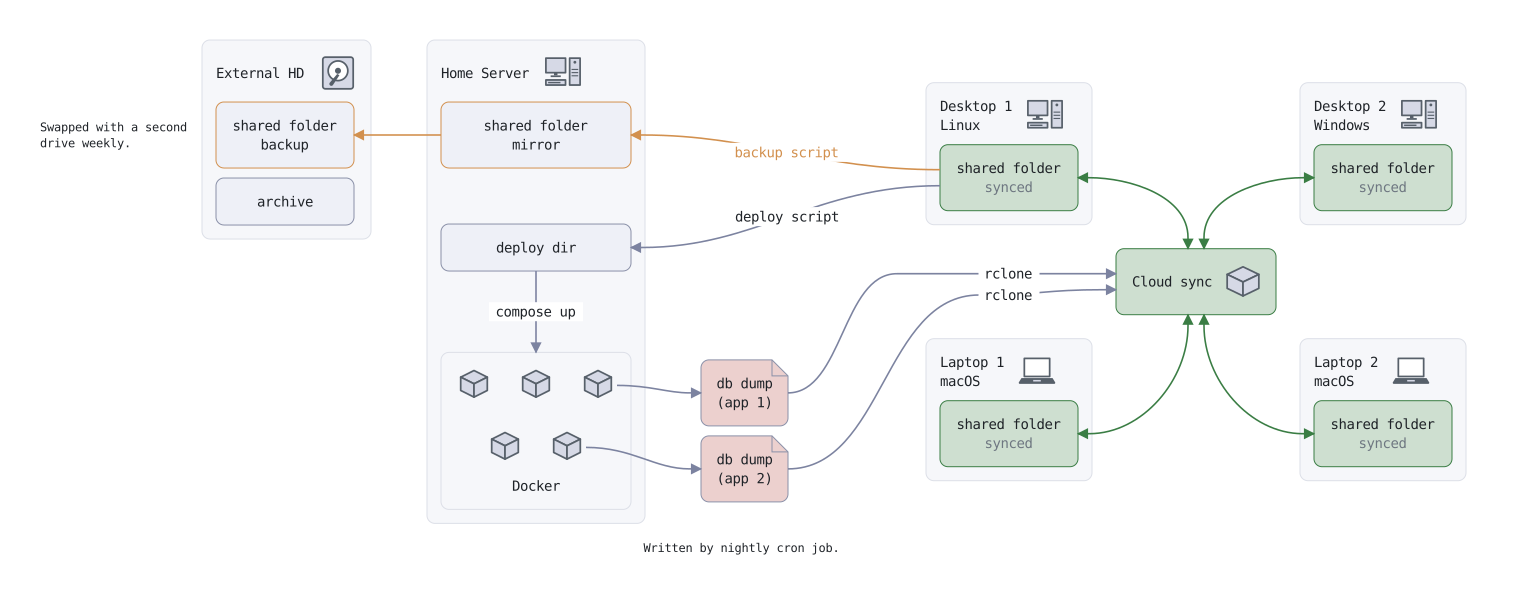
Architecture

architecture
// Transcribed from a draw.io diagram.

// --- Styles -----------------------------------------------------------------
style synced     fill: theme-primary-subtle  border: theme-primary  line: theme-primary
style dim        text: (color: theme-muted)
style backup     border: #d2904e  line: #d2904e
style dump       fill: theme-secondary-subtle  border: theme-border  shape: document
style invisible  fill: none  border: none


// --- The hub and its four machines ------------------------------------------
// The cluster is wrapped in an invisible container so things outside it can be
// placed against the whole cluster rather than against the hub alone.

node cluster ""  style: invisible

node cluster.hub "Cloud sync"  badge: package  style: synced

node cluster.desktop1       "Desktop 1 / Linux"    above-left of cluster.hub   gap: tight  badge: desktop
node cluster.desktop1.files "shared folder / [dim]synced[/dim]"  style: synced

node cluster.desktop2       "Desktop 2 / Windows"  above-right of cluster.hub  gap: tight  badge: desktop
node cluster.desktop2.files "shared folder / [dim]synced[/dim]"  style: synced

node cluster.laptop1        "Laptop 1 / macOS"     below-left of cluster.hub   gap: tight  badge: laptop
node cluster.laptop1.files  "shared folder / [dim]synced[/dim]"  style: synced

node cluster.laptop2        "Laptop 2 / macOS"     below-right of cluster.hub  gap: tight  badge: laptop
node cluster.laptop2.files  "shared folder / [dim]synced[/dim]"  style: synced

edge cluster.desktop1.files <-> cluster.hub  style: synced  from: right  to: top
edge cluster.desktop2.files <-> cluster.hub  style: synced  from: left   to: top
edge cluster.laptop1.files  <-> cluster.hub  style: synced  from: right  to: bottom
edge cluster.laptop2.files  <-> cluster.hub  style: synced  from: left   to: bottom


// --- The database dumps -----------------------------------------------------
// Nothing says how wide the corridor between the server and the machines is.
// Putting the dumps in between is what pushes those two apart.

node dumps ""  right of server.docker  left of cluster (gap: wide)  level with server.docker  style: invisible
node dumps.db1 "db dump / (app 1)"  style: dump
node dumps.db2 "db dump / (app 2)"  style: dump

node dumps_note "Written by nightly cron job." (wrap: 30)  below dumps  gap: tight  shape: none


// --- The server -------------------------------------------------------------

node server         "Home Server"  left of cluster  badge: desktop  contents: (widths: match)
node server.mirror  "shared folder / mirror"  style: backup
node server.deploy  "deploy dir"  below server.mirror  gap: normal

// The cubes are nodes rather than ornament: two of them are where the dump
// arrows start. The lower pair is centered under the upper three by naming two
// targets and nothing else.
node server.docker  "Docker" (at: bottom-center, align: center)  below server.deploy  gap: normal
node server.docker.a  icon: cube
node server.docker.b  right of server.docker.a  gap: tight  icon: cube
node server.docker.db1  right of server.docker.b  gap: tight  icon: cube
node server.docker.c  below server.docker.a and server.docker.b    gap: tight  icon: cube
node server.docker.db2  below server.docker.b and server.docker.db1  gap: tight  icon: cube

edge server.deploy -> server.docker  "compose up"

edge server.docker.db1 -> dumps.db1  from: right  to: left
edge server.docker.db2 -> dumps.db2  from: right  to: left

// The rclone lines run up the channel between the two left-hand machines, so
// the dumps arrive through the middle of the cluster rather than across one.
edge dumps.db1 -> cluster.hub  "rclone"  between cluster.desktop1 and cluster.laptop1  from: right  to: left
edge dumps.db2 -> cluster.hub  "rclone"  between cluster.desktop1 and cluster.laptop1  from: right  to: left

edge cluster.desktop1.files -> server.mirror  "backup script"  style: backup  from: left  to: right
edge cluster.desktop1.files -> server.deploy  "deploy script"                 from: left  to: right


// --- The backup drive -------------------------------------------------------

node drive          "External HD"  left of server  top level with server  badge: disk  contents: (widths: match)
node drive.mirror   "shared folder / backup"  style: backup
node drive.archive  "archive"

edge server.mirror -> drive.mirror  style: backup  from: left  to: right

node drive_note "Swapped with a second drive weekly." (wrap: 22)  left of drive.mirror  gap: tight  shape: none

example-architecture__reladraw.svg

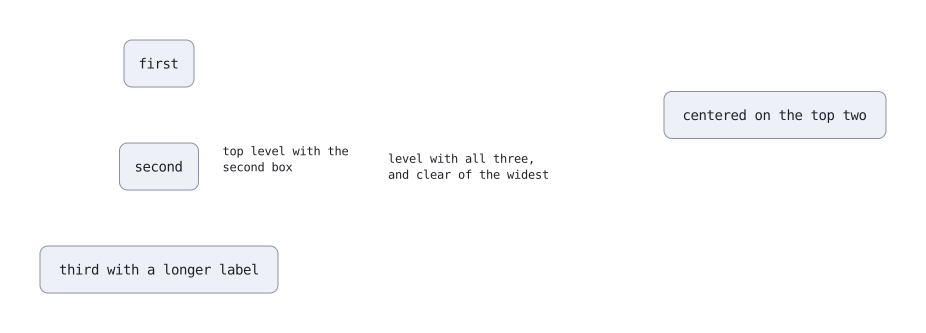
Beside a group

A node placed against several others at once.

beside a group
// Naming several targets places a node against the region that bounds them all.

node one    "first"
node two    "second"                 below one
node three  "third with a longer label"  below two

// A direction clears the furthest of them. This one says nothing about its own
// vertical position — that comes from the region.
node spans  "level with all three, and clear of the widest" (wrap: 24)  right of one and three  gap: wide  shape: none

// An alignment uses the region as a position. "top" is its top edge, not its middle.
node tops   "top level with the second box" (wrap: 20)                  right of two  top level with two  gap: tight  shape: none

node beside  "centered on the top two"  right of spans  level with one and two  gap: wide
example-beside-a-group__reladraw.svg

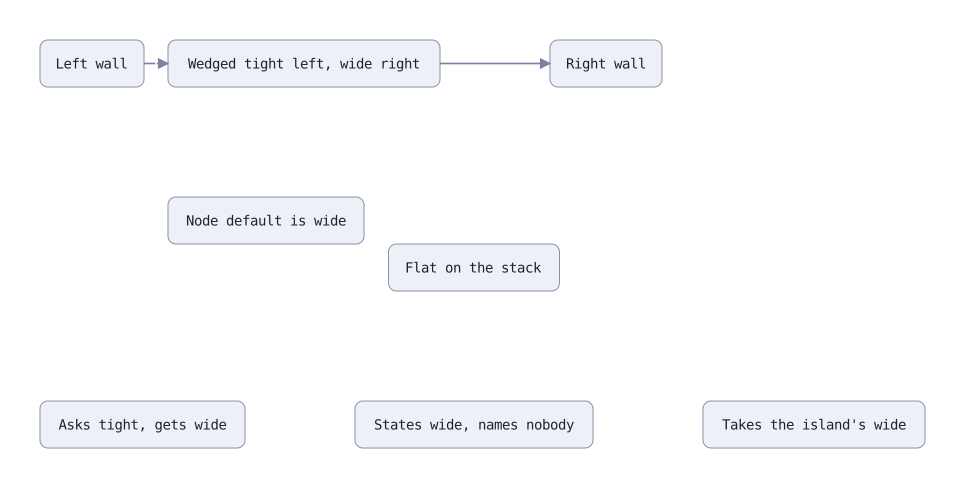
Gap sizes

Tight and wide gaps, and which one wins when both ends ask.

gap sizes
// Gaps: on a placement, on a node, and what happens when both ends ask.

style plain  fill: theme-fill  border: theme-border

node left_wall  "Left wall"   style: plain
node right_wall "Right wall"  right of left_wall  style: plain

// Both sides bind and they want different distances, so each placement carries
// its own gap.
node wedge "Wedged tight left, wide right"  right of left_wall (gap: tight)  left of right_wall (gap: wide)  level with left_wall  style: plain

// `gap:` on the node is the default for whatever the placements do not say.
node stack "Node default is wide"  below wedge  right of left_wall (gap: tight)  gap: wide  style: plain

// `none` is contact, and the other placement still keeps its distance.
node shelf "Flat on the stack"  below stack (gap: none)  right of left_wall (gap: tight)  style: plain

edge left_wall -> wedge  from: right  to: left
edge wedge -> right_wall  from: right  to: left

// A node's gap also reaches placements written against it. `island` names nobody
// and asks for wide, so both neighbors are held off at that distance. `west`
// asks for tight and gets wide: a gap is a minimum, so the larger one holds.
node island "States wide, names nobody"  below shelf  gap: wide  style: plain
node east   "Takes the island's wide"    right of island  level with island  style: plain
node west   "Asks tight, gets wide"      left of island   level with island  gap: tight  style: plain
example-gap-sizes__reladraw.svg

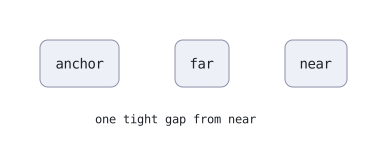
As close as allowed

A node sits as close to what it names as its placements allow.

as close as allowed
// A node sits as close to what it names as its placements allow.

node anchor "anchor"
node far    "far"   right of anchor
node near   "near"  right of far

node trailing "one tight gap from near"  left of near  below anchor  gap: tight  overlap: allow  shape: none
example-as-close-as-allowed__reladraw.svg

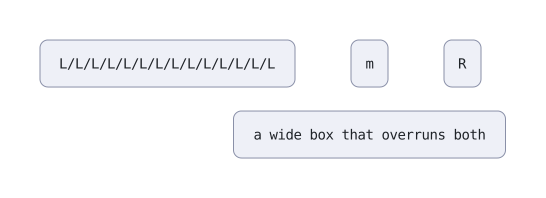
No overlaps

Nodes never overlap, even where nothing says which way to move.

no overlaps
// Nodes never overlap. Nothing here says the wide node has to clear "left".
//
// Which way it moves is read off the file: "middle" is right of "left", so
// rightward is the way that contradicts nothing written. And "left" is tall, so
// the two overlap far less horizontally than vertically.

node left    "L/L/L/L/L/L/L/L/L/L/L/L/L/L"
node right   "R"                             right of left
node middle  "m"   right of left  left of right  level with left
node wide    "a wide box that overruns both"    below middle  gap: tight
example-no-overlaps__reladraw.svg

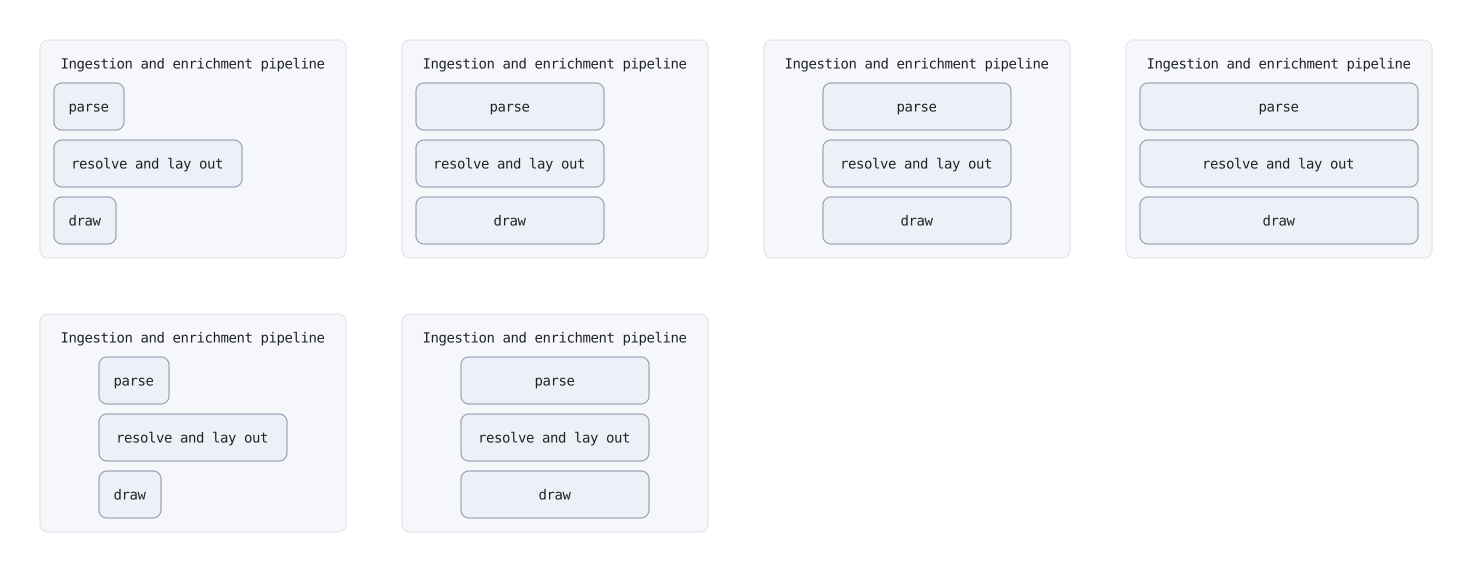
Inside a container

How children line up in a container wider than they are.

inside a container
// How a container's contents sit inside it, when the container is wider than
// they are. A container is as wide as the wider of its title and its contents,
// so a long title leaves slack — and every member sits at the smallest position
// its constraints allow, which puts all of that slack on the right.
//
// `contents: (widths: …, align: …)`. The two are independent: equal widths
// ranged left is a real arrangement, and so is natural widths centered.

style plain  fill: theme-fill  border: theme-border

// Nothing said. Natural widths, and the column sits against the left.
node ragged "Ingestion and enrichment pipeline" (at: top-center, align: center)
node ragged.one   "parse"  style: plain
node ragged.two   "resolve and lay out"  style: plain
node ragged.three "draw"  style: plain

// One edge down each side of the column, still against the left of the slack.
node block "Ingestion and enrichment pipeline" (at: top-center, align: center)  right of ragged  contents: (widths: match)
node block.one   "parse"  style: plain
node block.two   "resolve and lay out"  style: plain
node block.three "draw"  style: plain

// The same column, moved into the middle of the room the title asked for.
node middle "Ingestion and enrichment pipeline" (at: top-center, align: center)  right of block  contents: (widths: match, align: center)
node middle.one   "parse"  style: plain
node middle.two   "resolve and lay out"  style: plain
node middle.three "draw"  style: plain

// `fill` takes the whole band, so there is no slack left for `align` to say
// anything about. Under a title this long that is what `match` could not do.
node full "Ingestion and enrichment pipeline" (at: top-center, align: center)  right of middle  contents: (widths: fill)
node full.one   "parse"  style: plain
node full.two   "resolve and lay out"  style: plain
node full.three "draw"  style: plain

// Natural widths, centered: the column keeps its ragged edges and the block of
// them sits in the middle. The cell of the cross product that needs both words.
node loose "Ingestion and enrichment pipeline" (at: top-center, align: center)  below ragged  contents: (align: center)
node loose.one   "parse"  style: plain
node loose.two   "resolve and lay out"  style: plain
node loose.three "draw"  style: plain

// A style may carry it, which `align: widths` never could — it read only what
// the node itself wrote, so a style carrying it did nothing and said nothing.
style boxed  contents: (widths: match, align: center)

node carried "Ingestion and enrichment pipeline" (at: top-center, align: center)  right of loose  style: boxed
node carried.one   "parse"  style: plain
node carried.two   "resolve and lay out"  style: plain
node carried.three "draw"  style: plain
example-inside-a-container__reladraw.svg

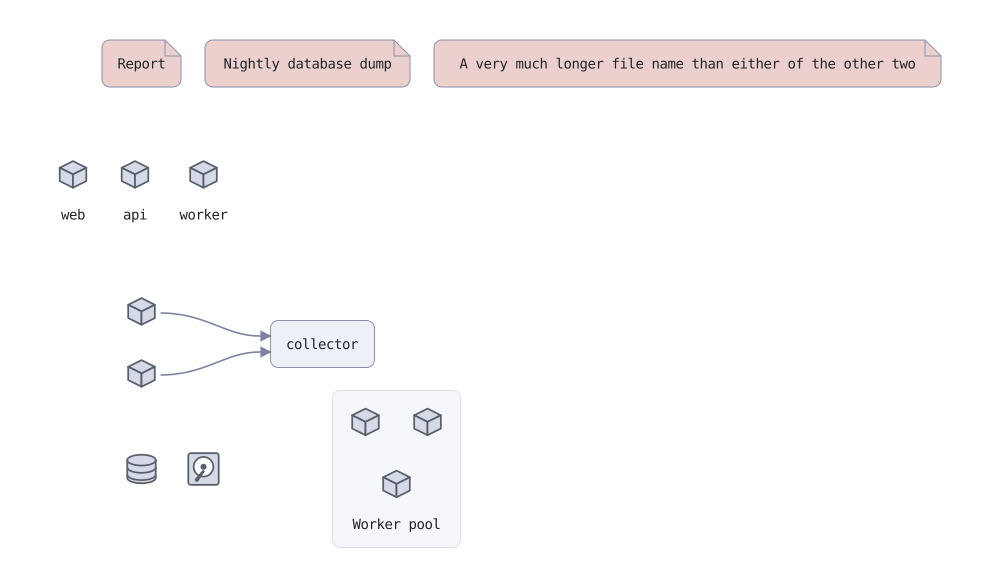
Shapes

The outlines a node can be drawn with, and the pictures it can be drawn as.

shapes
// What a node is drawn as. `shape:` is the outline it is drawn with; `icon:` is
// a picture it is drawn as, with no box at all.

style artifact  fill: theme-secondary-subtle  border: theme-border  shape: document

// The fold is a fixed size rather than a fraction of the box, so it looks the
// same on all three of these.
node narrow "Report"  style: artifact
node medium "Nightly database dump"        right of narrow  gap: tight  style: artifact
node wide   "A very much longer file name than either of the other two"  right of medium  gap: tight  style: artifact

// A picture has no outline, no fill and no padding. The text goes underneath.
node services ""  below narrow  gap: normal  fill: none  border: none
node services.web    "web"                          icon: cube
node services.api    "api"     right of services.web  gap: tight  icon: cube
node services.worker "worker"  right of services.api  gap: tight  icon: cube

// No text at all: a picture usually is the statement, so it gets no caption.
node bare1  below services (gap: normal)  icon: cube
node bare2  below bare1     gap: tight  icon: cube

// A picture body is an ordinary node, so it takes edges and sides like any
// other. That is what it buys over a badge, which cannot be the end of an arrow.
node sink "collector"  right of bare1 and bare2 (gap: wide)  level with bare1, bare2
edge bare1 -> sink  from: right  to: left
edge bare2 -> sink  from: right  to: left

// Any icon works as a body, not just the cube.
node store  below bare2 (gap: normal)  icon: database
node drive  right of store  gap: tight  icon: disk

// `at: bottom-center` puts the text under the contents, and `align: center`
// ranges its lines against each other; neither implies the other. The lower cube is centered under the upper
// pair by naming both of them and nothing else.
node pool "Worker pool" (at: bottom-center, align: center)  right of store and drive (gap: wide)  level with store, drive
node pool.one  icon: cube
node pool.two  right of pool.one  gap: tight  icon: cube
node pool.three  below pool.one and pool.two  gap: tight  icon: cube
example-shapes__reladraw.svg

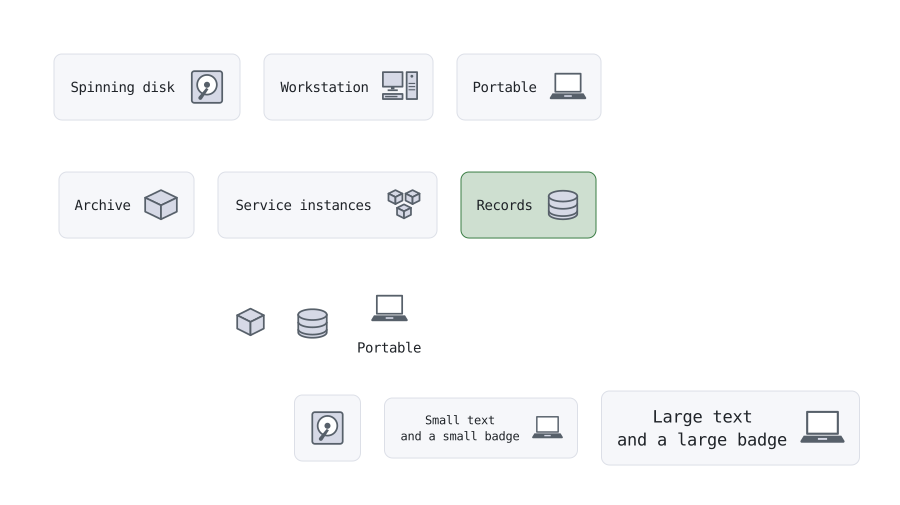
Icons

The seven icons, and the ways to use one.

icons
// The seven icons, and the two ways to use one: badge: puts the picture beside
// a node's text, and icon: draws the node as the picture, with no box.

// A style can carry a badge, so every store in a diagram looks alike without
// anyone typing the word twice.
style store  fill: theme-primary-subtle  border: theme-primary  badge: database

// badge: is shorthand. row1.disk below is the same as writing
//   node row1.disk "Spinning disk"
//   node row1.disk.badge  icon: disk  right of row1.disk text
node row1 ""  fill: none  border: none
node row1.disk     "Spinning disk"     badge: disk
node row1.desktop  "Workstation"       right of row1.disk     gap: tight  badge: desktop
node row1.laptop   "Portable"          right of row1.desktop  gap: tight  badge: laptop

node row2 ""  below row1  gap: tight  fill: none  border: none
node row2.package  "Archive"           badge: package
node row2.cubes    "Service instances" right of row2.package  gap: tight  badge: cubes
node row2.db       "Records"           right of row2.cubes    gap: tight  style: store

// icon: the node is the picture itself, and has no text unless you give it one.
node row3 ""  below row2  gap: tight  fill: none  border: none
node row3.cube     icon: cube
node row3.db       icon: database    right of row3.cube     gap: tight
node row3.laptop   "Portable"  icon: laptop  right of row3.db  gap: tight

// No text, so the node is just the badge and its padding.
node bare ""  below row3  gap: tight  badge: disk

// A badge is two lines tall, so it shrinks and grows with the text beside it.
node small "Small text / and a small badge" (size: small)  right of bare   gap: tight  badge: laptop
node large "Large text / and a large badge" (size: large)  right of small  gap: tight  badge: laptop
example-icons__reladraw.svg

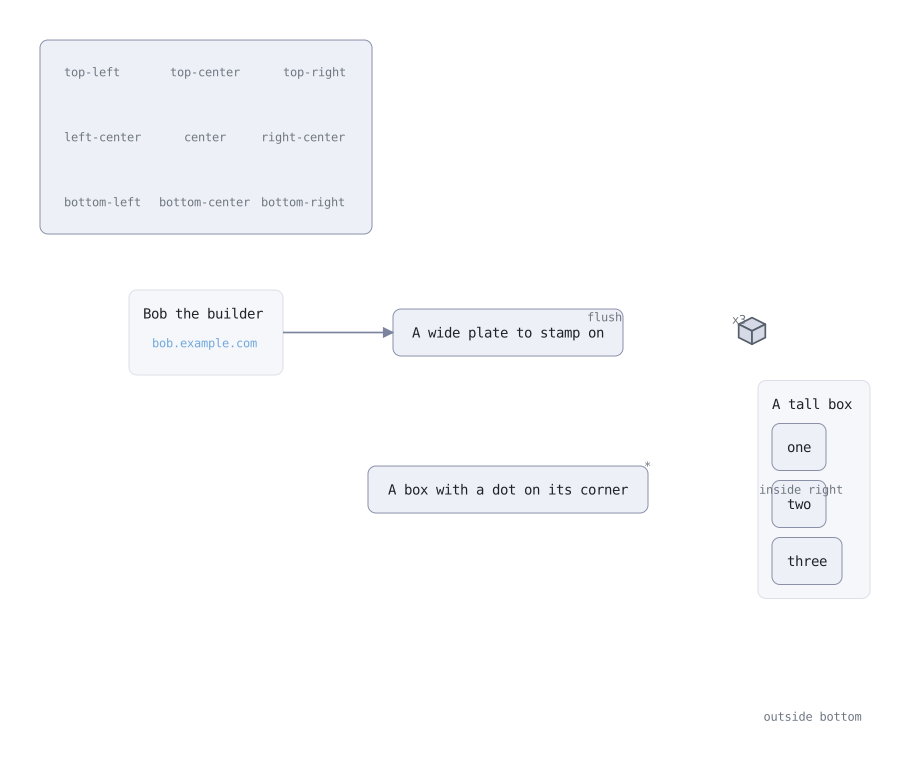
Sides and corners

Nodes placed against part of another node: a side, a corner, or its text.

sides and corners
// A placement's target may be a *part* of a node — its text, one of its four
// sides, or one of its nine points — written as a separate word after the
// node's name. Three direction words go with a part:
//
//   inside   wholly within, against that part
//   outside  wholly beyond it
//   on       centered on it, so a node on a corner straddles it
//
// `inside` and `outside` are shorthands whose expansion is derived rather than
// listed: inside is the direction from the named part toward the box's center,
// outside is away from it. `inside right` is `left of`, `inside top-right` is
// `below-left of`, and nobody writes a table.

style mark   shape: none  text: (color: theme-muted)
style spacer  fill: none  border: none
style link  shape: none  text: (color: #6fa8dc)

// All nine points at once. The board is held open by six invisible children
// with nothing in them, which is also the point being made: a box is sized by
// what it *holds*, and the nine marks stamped on it are not held by anything.
node board ""  fill: theme-fill  border: theme-border
node board.nw ""  style: spacer
node board.n  ""  style: spacer  right of board.nw  gap: wide
node board.ne ""  style: spacer  right of board.n   gap: wide
node board.sw ""  style: spacer  below board.nw  gap: wide
node board.s  ""  style: spacer  right of board.sw  below board.n   gap: wide
node board.se ""  style: spacer  right of board.s   below board.ne  gap: wide

node p1 "top-left"       inside board top-left       style: mark
node p2 "top-center"     inside board top-center     style: mark
node p3 "top-right"      inside board top-right      style: mark
node p4 "left-center"    inside board left-center    style: mark
node p5 "center"         on board center             style: mark
node p6 "right-center"   inside board right-center   style: mark
node p7 "bottom-left"    inside board bottom-left    style: mark
node p8 "bottom-center"  inside board bottom-center  style: mark
node p9 "bottom-right"   inside board bottom-right   style: mark

// The case the design record names: an ordinary box with its text in the middle
// and, centered at the bottom inside it, a small link.
node bob "Bob the builder"  below board  gap: normal
node bob.card ""  style: spacer
node bob_link "bob.example.com"  inside bob bottom-center  style: link  url: "https://bob.example.com"

// The inset is a named gap on the placement, and `none` puts the node hard
// against the edge. It is deliberately not the node's own `gap:`, which says
// how this node stands off its neighbours rather than how far in a stamp sits.
node plate "A wide plate to stamp on"  right of bob  gap: wide
node flush "flush"  inside plate top-right (gap: none)  style: mark

// `on` is the thing the old dedicated overlay word could not say: the node's
// center on the point, so it straddles the corner instead of tucking inside.
node dot "A box with a dot on its corner"  below plate  gap: wide
node straddle "*"  on dot top-right  style: mark

// A side is a segment rather than a point, so the axis it does not name is
// left free — this sits against the right edge and centers down it.
node column "A tall box"  right of dot  gap: wide
node column.one "one"
node column.two "two"
node column.three "three"
node column_mark "inside right"  inside column right  style: mark

// `outside` is the same rule read the other way: wholly beyond the named
// part, which is how a caption sits clear of one edge and no other.
node under "outside bottom"  outside column bottom  style: mark

// A part target works on a picture as readily as on a box.
node unit  icon: cube  right of plate  gap: normal
node tag "x3"  inside unit bottom-right  style: mark

// The overlap exemption is for the pair and nothing else: `flush` is still kept
// clear of everything in the drawing that is not `plate`.
edge bob -> plate  from: right  to: left
example-sides-and-corners__reladraw.svg

On the parent's edge

A child placed on its own container's side or corner.

on the parent's edge
// A child may be placed against a part of its own parent — a side, a corner,
// or the parent's text — with the same words used against anything else. The
// parent grows to hold it. Whether the parent has a title band is not stated
// anywhere: there is one when something sits below the text, and not when
// everything sits beside it or against the frame.

style mark  fill: #cdb96f  border: #8f7a3a  text: (color: #111111)

// Four children in the four corners, and nothing below the text, so there is
// no band: the text sits in the middle, as a leaf's does.
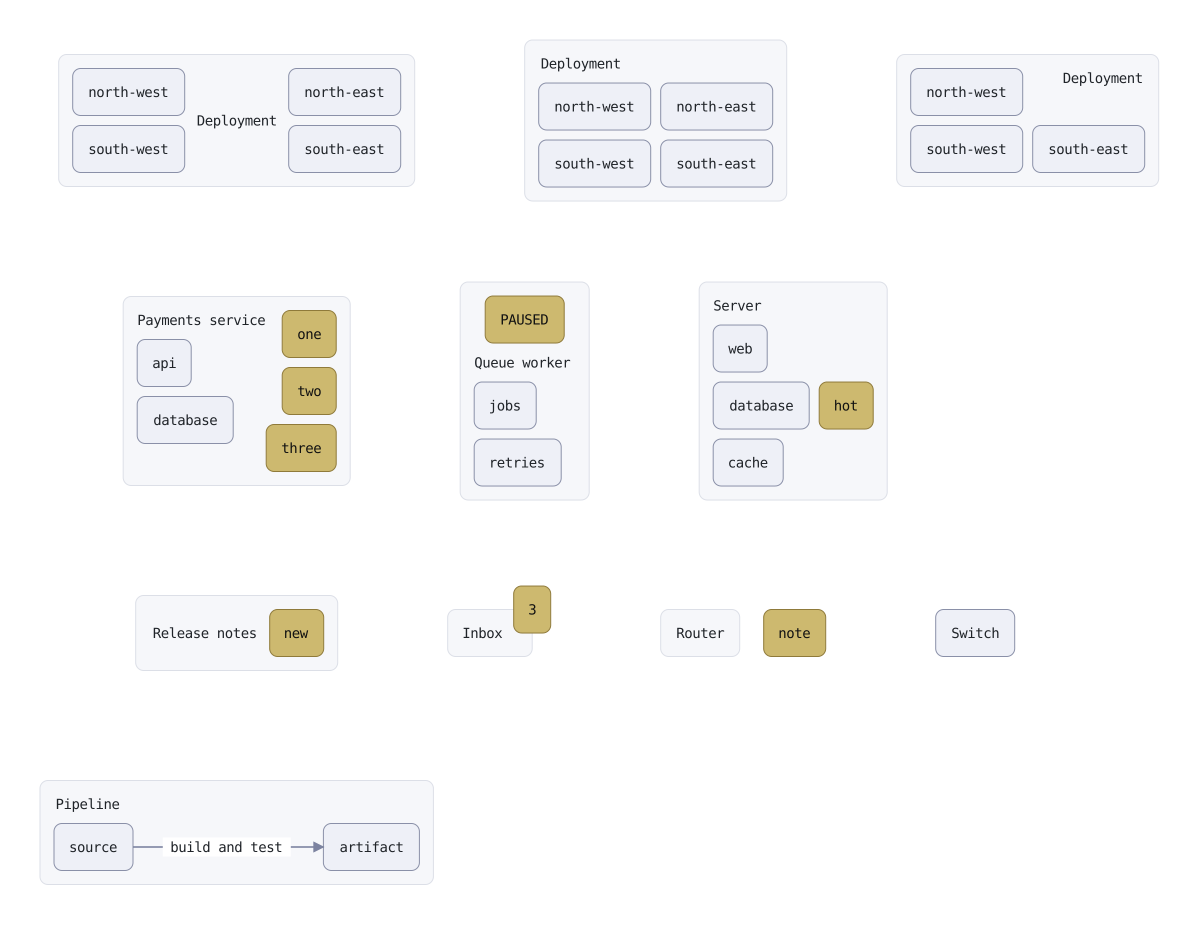
node corners "Deployment"
node corners.a "north-west"  inside corners top-left
node corners.b "north-east"  inside corners top-right
node corners.c "south-west"  inside corners bottom-left
node corners.d "south-east"  inside corners bottom-right

// Put two of them below the text and the band is back, made by placement.
node band "Deployment"  right of corners  gap: wide
node band.a "north-west"  below band text  inside band left
node band.b "north-east"  below band text  inside band right
node band.c "south-west"  inside band bottom-left
node band.d "south-east"  inside band bottom-right

// With a corner free there is room in the text's row, and `at:` ranges the
// text across it.
node ranged "Deployment" (at: top-right)  right of band  gap: wide
node ranged.a "north-west"  inside ranged top-left
node ranged.c "south-west"  inside ranged bottom-left
node ranged.d "south-east"  inside ranged bottom-right

// Three children naming the same side are one group: a column in the order
// written, centered on the side together. The ordinary contents keep their
// stack beside it.
node column "Payments service"  below corners  gap: wide
node column.api "api"
node column.db "database"
node column.one "one"      inside column right  style: mark
node column.two "two"      inside column right  style: mark
node column.three "three"  inside column right  style: mark

// A child against the top side sits over the title, and the title and the
// contents make way below it.
node paused "Queue worker"  right of column  gap: wide
node paused.jobs "jobs"
node paused.retry "retries"
node paused.flag "PAUSED"  inside paused top  style: mark

// A side and a row at once: against the right edge, level with one child.
node server "Server"  right of paused  gap: wide
node server.web "web"
node server.db "database"
node server.cache "cache"
node server.hot "hot"  inside server right  level with server.db  style: mark

// Beside the text, the way a badge is. With nothing below the text the two
// center in the box as one group.
node fresh "Release notes"  below column  gap: wide
node fresh.tag "new"  right of fresh text  style: mark

// On a corner rather than inside it: centered on the point, so it straddles
// the edge.
node dot "Inbox"  right of fresh  gap: wide
node dot.count "3"  on dot top-right  style: mark

// Beyond the frame. The note is still part of the router, so the switch
// placed right of the router keeps clear of the note too.
node router "Router"  right of dot  gap: wide
node router.note "note"  outside router right (gap: tight)  style: mark
node switch "Switch"  right of router

// An edge's text between two children placed against the frame opens the gap
// it crosses, exactly as it does between two ordinary children.
node pipe "Pipeline"  below fresh  gap: wide
node pipe.src "source"    below pipe text  inside pipe left
node pipe.out "artifact"  below pipe text  inside pipe right
edge pipe.src -> pipe.out  "build and test"  from: right  to: left
example-on-the-parent-s-edge__reladraw.svg

Edge labels

An edge's text widens the gap it crosses.

edge labels
// An edge with text widens the gap it crosses.

style plain  fill: theme-fill  border: theme-border

// Nothing here says how far apart these two sit. The default gap is sized for
// two nodes to breathe, not to hold a word, so the text opens it.
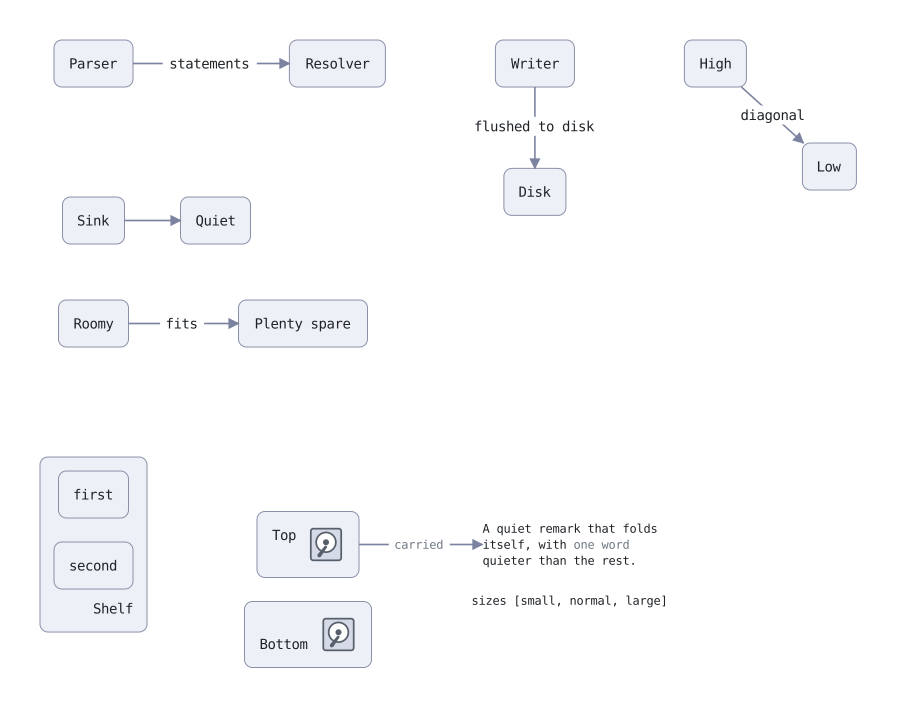
node parser   "Parser"                     style: plain
node resolver "Resolver"  right of parser  style: plain
edge parser -> resolver  "statements"  from: right  to: left

// The same two placements with nothing on the edge, for comparison.
node sink  "Sink"   below parser (gap: wide)  style: plain
node quiet "Quiet"  right of sink  level with sink       style: plain
edge sink -> quiet  from: right  to: left

// Going downward the text is only a line deep, so it opens the gap by one line
// and hangs out either side.
//
// Written with `<-`, which draws the same picture as `writer -> disk`. It just
// puts the node the line is about first. `from:` is still the first name
// written, so it names Disk's side.
node writer "Writer"  right of resolver (gap: wide)  style: plain
node disk   "Disk"    below writer                  style: plain
edge disk <- writer  "flushed to disk"  from: top  to: bottom

// Already wider than the text needs, so nothing moves.
node roomy "Roomy"        below sink                                 style: plain
node spare "Plenty spare"  right of roomy (gap: wide)  level with roomy  style: plain
edge roomy -> spare  "fits"  from: right  to: left

// Corner to corner, so there is no single gap the text sits in and nothing is
// widened for it.
node high "High"  right of writer (gap: wide)  style: plain
node low  "Low"   below high  right of high  style: plain
edge high -> low  "diagonal"


// --- What the brackets after a text say ------------------------------------
// `at` is where the block of text sits — one of the nine named positions —
// and `align` is how its lines range against each other once it is there.
// Neither implies the other.

style dim  text: (color: theme-muted)

node shelf "Shelf" (at: bottom-right, align: right)  below roomy (gap: wide)  style: plain
node shelf.one "first"   style: plain
node shelf.two "second"  below shelf.one (gap: tight)  style: plain

// A box is usually the size of its own text, so `at` is inert on one. An icon
// against the box's right side is two lines tall, which gives a shorter text
// beside it room to move. A badge would not: it is placed against the text, so
// it goes where the text goes.
node tall "Top" (at: top-left)     right of shelf (gap: wide)  style: plain
node tall.disk  icon: disk  inside tall right
node deep "Bottom" (at: bottom-left)  below tall (gap: tight)  style: plain
node deep.disk  icon: disk  inside deep right

// `size` and `wrap` are properties of the text too. The wrap is a count of
// characters, not a distance: it says how much fits on a line and nothing
// about where anything sits.
node aside "A quiet remark that folds itself, with [dim]one word[/dim] quieter than the rest." (size: small, wrap: 28)  right of tall (gap: wide)  shape: none

// A literal bracket is written \[, since [ opens markup.
node literal "sizes \[small, normal, large]"  below aside  gap: tight  shape: none

// An edge's text takes the same brackets, less `at`. A size may be a number of
// pixels as well as a name.
edge tall -> aside  "carried" (color: theme-muted, size: 12)  from: right  to: left
example-edge-labels__reladraw.svg

Nested edges

Edges between the same two sides nest instead of crossing.

nested edges
// Several edges between the same two sides nest instead of crossing. The lanes
// are as wide as the texts riding in them.

style plain  fill: theme-fill  border: theme-border

// A reciprocal pair around a corner. Further left along Gateway's bottom is
// further down Queue's left, so the order reverses between the two ends.
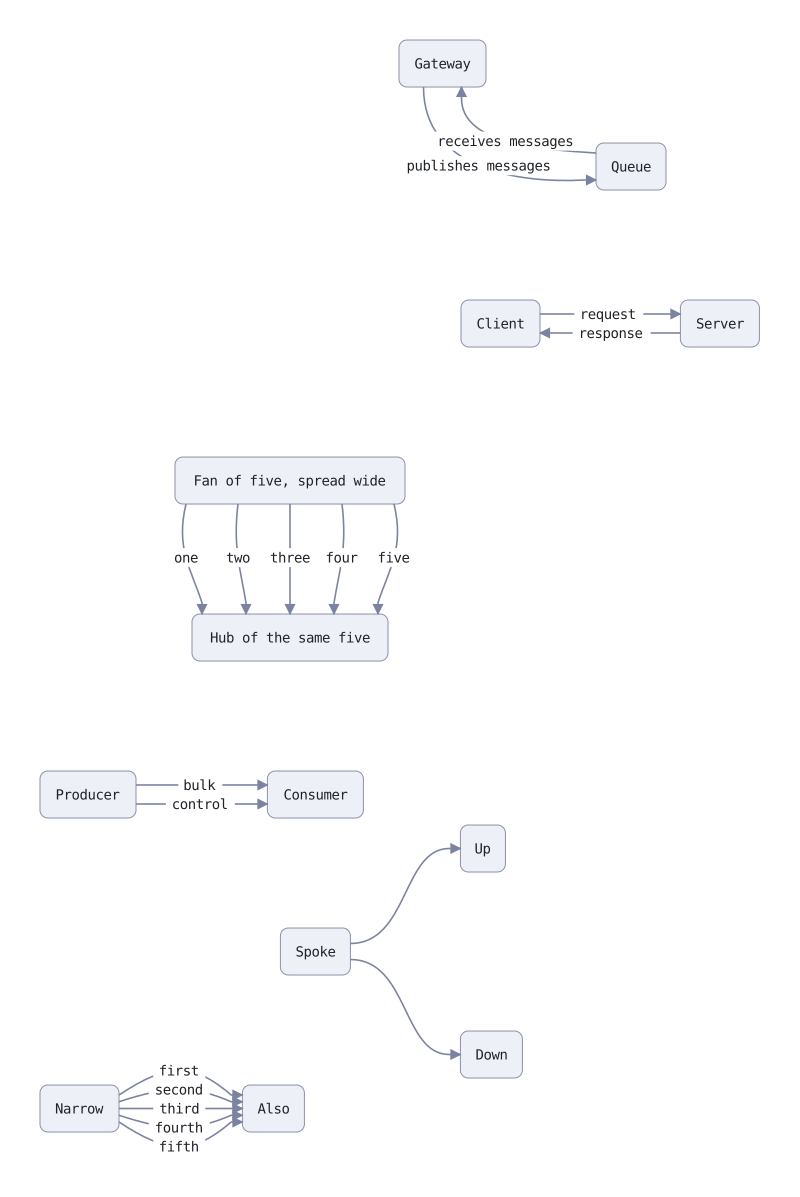
node gateway "Gateway"  style: plain
node queue   "Queue"    below gateway  right of gateway (gap: wide)  style: plain
edge gateway -> queue  "publishes messages"  from: bottom  to: left
edge queue -> gateway  "receives messages"   from: left    to: bottom

// Two edges facing each other, where the order runs the same way at both ends.
node client "Client"  below queue (gap: wide)  left of queue  style: plain
node server "Server"  right of client (gap: wide)  level with client  style: plain
edge client -> server  "request"   from: right  to: left
edge server -> client  "response"  from: left   to: right

// Five lanes down a vertical run. The texts all sit at the same height, so the
// only way they clear each other is sideways and a lane has to be a whole text
// wide. These two nodes are wide enough for five of them.
node fan  "Fan of five, spread wide"  below client (gap: wide)  left of client  style: plain
node hub  "Hub of the same five"     below fan (gap: wide)  style: plain
edge fan -> hub  "one"    from: bottom  to: top
edge fan -> hub  "two"    from: bottom  to: top
edge fan -> hub  "three"  from: bottom  to: top
edge fan -> hub  "four"   from: bottom  to: top
edge fan -> hub  "five"   from: bottom  to: top

// Two edges pointing the same way. Nothing tells them apart, so the order they
// are written in decides. Swap these two lines and the texts swap lanes.
node left_wall  "Producer"  below hub (gap: wide)  left of hub  style: plain
node right_wall "Consumer"  right of left_wall (gap: wide)  level with left_wall  style: plain
edge left_wall -> right_wall  "bulk"     from: right  to: left
edge left_wall -> right_wall  "control"  from: right  to: left

// Sharing one side only is not a bundle. The far ends differ, and that is
// enough to order them.
node spoke "Spoke"  below right_wall (gap: wide)  style: plain
node up    "Up"     above spoke  right of spoke (gap: wide)  style: plain
node down  "Down"   below spoke  right of spoke (gap: wide)  style: plain
edge spoke -> up    from: right  to: left
edge spoke -> down  from: right  to: left

// More edges than the two sides can hold. The arrowheads squeeze together
// because there is nowhere further along an edge to go, and each line makes up
// the shortfall by bowing out in the middle, where the texts ride.
node narrow "Narrow"  below spoke (gap: wide)  left of spoke  style: plain
node also   "Also"    right of narrow (gap: wide)  level with narrow  style: plain
edge narrow -> also  "first"   from: right  to: left
edge narrow -> also  "second"  from: right  to: left
edge narrow -> also  "third"   from: right  to: left
edge narrow -> also  "fourth"  from: right  to: left
edge narrow -> also  "fifth"   from: right  to: left
example-nested-edges__reladraw.svg

Parallel edges

Several edges between the same two nodes stay parallel.

parallel edges
// Several edges between the same two nodes with no side named anywhere. Each
// line is shifted sideways off the one a single edge would draw, so they stay
// parallel and each end lands wherever its own line crosses the border.

style plain  fill: theme-fill  border: theme-border

// Level nodes, so the run is horizontal and the lanes fan out vertically.
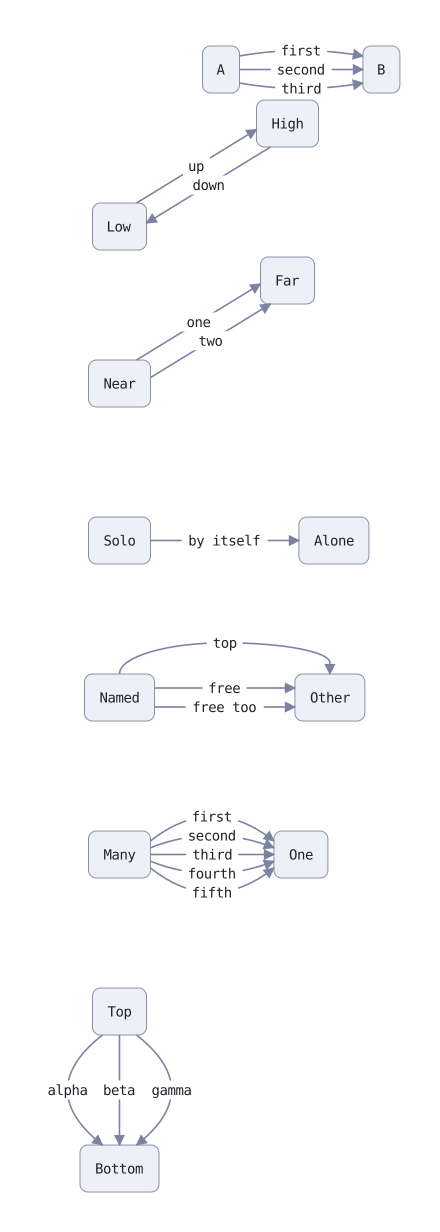
node a "A"  style: plain
node b "B"  right of a (gap: wide)  level with a  style: plain
edge a -> b  "first"
edge a -> b  "second"
edge a -> b  "third"

// A perfect diagonal, where the single line would leave through the corner
// exactly. These two straddle it, one point on each of the edges meeting there.
node low  "Low"   below a (gap: wide)  left of a  style: plain
node high "High"  above low  right of low (gap: wide)  style: plain
edge low -> high   "up"
edge high -> low   "down"

// A near diagonal, where the crossing point sits on one edge but close to the
// corner.
node near "Near"  below low (gap: wide)  style: plain
node far  "Far"   right of near (gap: wide)  above near  style: plain
edge near -> far  "one"
edge near -> far  "two"

// A lone edge is in no group and does not move.
node solo  "Solo"   below near (gap: wide)  style: plain
node alone "Alone"  right of solo (gap: wide)  level with solo  style: plain
edge solo -> alone  "by itself"

// Naming a side on either end takes an edge out of the group.
node named "Named"  below solo (gap: wide)  style: plain
node other "Other"  right of named (gap: wide)  level with named  style: plain
edge named -> other  "free"
edge named -> other  "free too"
edge named -> other  "top"  from: top  to: top

// More than the edges can hold. The ends squeeze together and each line bows
// out in the middle to make up what its ends could not give it, so the texts
// still come apart. The middle line has no shortfall and stays straight.
node many "Many"  below named (gap: wide)  style: plain
node one  "One"   right of many (gap: wide)  level with many  style: plain
edge many -> one  "first"
edge many -> one  "second"
edge many -> one  "third"
edge many -> one  "fourth"
edge many -> one  "fifth"

// The same on a vertical run, where the texts sit at one height and a lane is
// a whole text wide.
node top    "Top"     below many (gap: wide)  style: plain
node bottom "Bottom"  below top (gap: wide)  style: plain
edge top -> bottom  "alpha"
edge top -> bottom  "beta"
edge top -> bottom  "gamma"
example-parallel-edges__reladraw.svg

Through a gap

Edges sent through the gap between two named nodes.

through a gap
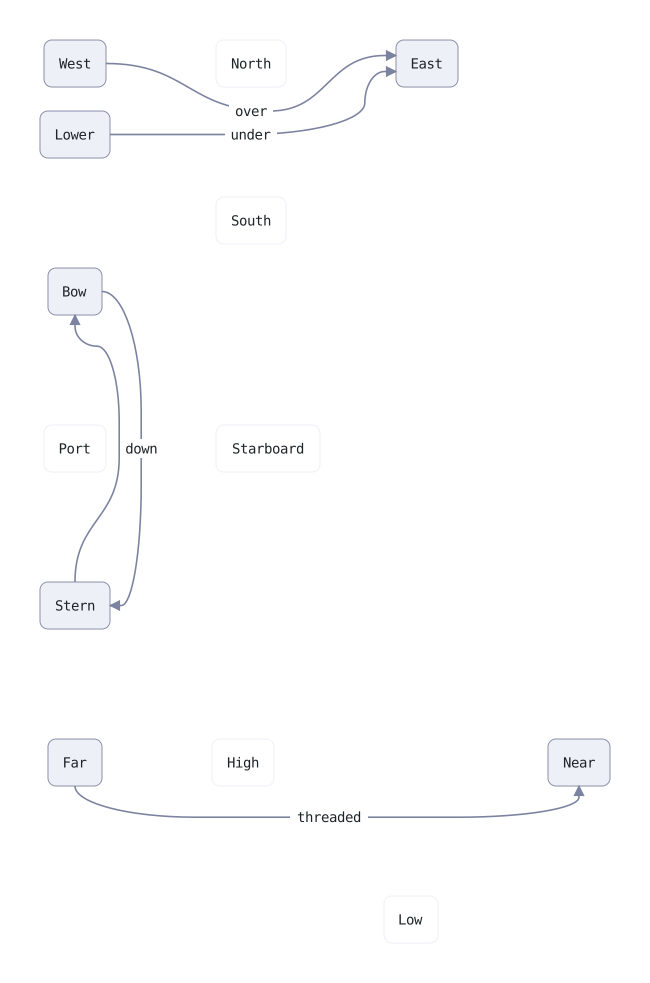
// `between a and b` sends an edge through the gap between two named things, for
// the stretch where it is passing them. Before and after, it goes wherever its
// ends take it.

style channel  fill: theme-page  border: theme-fill

// North and South are apart vertically, so that is the gap. Both edges start
// well to the left, climb into the channel, run along it and leave for East.
// They share it, so they take a lane each.

node west   "West"
node lower  "Lower"   below west     gap: tight
node north  "North"   right of west  gap: wide   style: channel
node south  "South"   below north    gap: wide   style: channel
node east   "East"    right of north and south  level with west  gap: wide

edge west  -> east  "over"   between north and south  from: right  to: left
edge lower -> east  "under"  between north and south  from: right  to: left

// Port and Starboard are apart horizontally, so here the line runs down the gap
// instead. This edge names no sides: the open end aims at the channel rather
// than at the far node, so it leaves Bow already heading for the gap.

node bow        "Bow"        below lower  gap: wide
node port       "Port"       below bow    gap: wide       style: channel
node starboard  "Starboard"  right of port  level with port  gap: wide  style: channel
node stern      "Stern"      below port   gap: wide

edge bow -> stern  "down"  between port and starboard

// The same channel travelled the other way. No text on this one, so its lane
// needs only the room two arrows need.

edge stern -> bow  between port and starboard  from: top  to: bottom

// High and Low sit diagonally, so there are two gaps between them and the file
// has to say which. `vertically` is the gap you measure with a vertical ruler —
// under High, over Low — so a line running along it travels sideways.

node far   "Far"    below stern  gap: wide
node high  "High"   right of far  gap: wide  style: channel
node low   "Low"    below-right of high  gap: wide  style: channel
node near  "Near"   right of low  level with high  gap: wide

edge far -> near  "threaded"  between high and low vertically
example-through-a-gap__reladraw.svg

Outside the nodes

Edges that run past the nodes, and the page grows to hold them.

outside the nodes
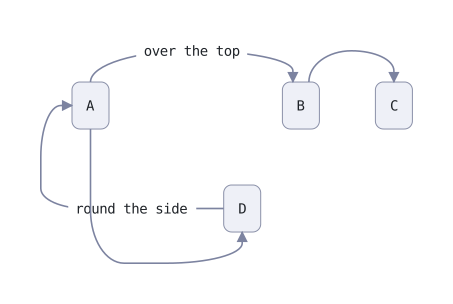
// Edges that leave the area the nodes cover. The page grows to hold them: the
// nodes here cover 421x230 and the page comes out 465x328.

style plain  fill: theme-fill  border: theme-border

node a "A"                            style: plain
node b "B"  right of a  (gap: wide)   style: plain
node c "C"  right of b                style: plain

node d "D"  below a and c             style: plain

// A long arch over everything, with the text at the top of it.
edge a -> b  "over the top"  from: top  to: top

// The same shape across a narrow gap.
edge b -> c  from: top  to: top

// Out the left and back into the bottom, so the loop hangs off the left edge.
edge d -> a  "round the side"  from: left  to: left

// And one under the bottom row.
edge a -> d  from: bottom  to: bottom
example-outside-the-nodes__reladraw.svg

Going round boxes

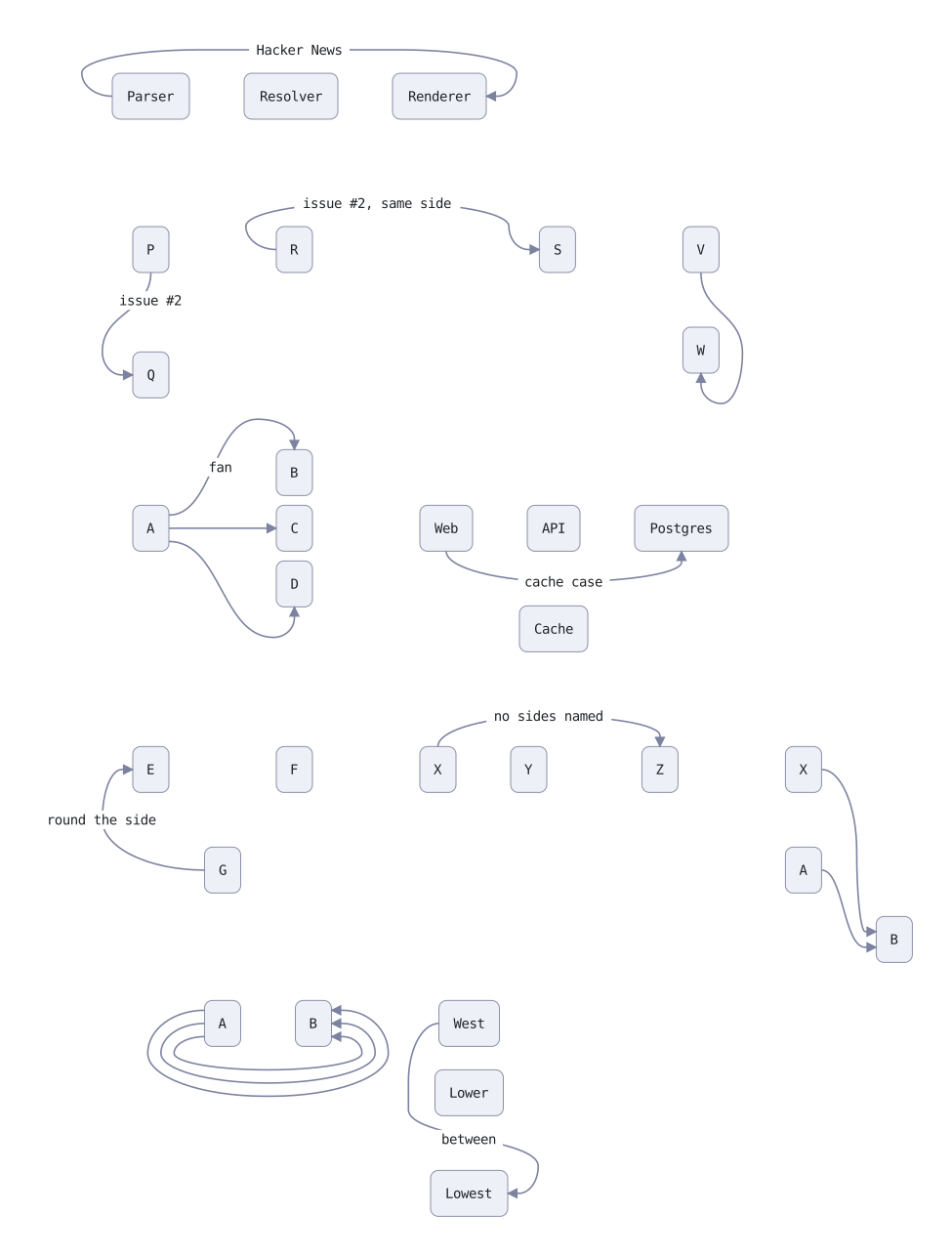
Every routing bug reported so far, each line now going the shortest way round.

going round boxes
// Every routing bug reported so far, one row each, the line's text saying
// where it was reported. Each of these was drawn through a box, on top of
// another line, or hard against a box's edge at some point. Every line now
// takes the shortest way round that passes through none, keeps a lane of its
// own, and keeps its distance.

// Hacker News, 2026-09-26: ends facing away across a row. The line ran
// straight through the middle node, its text sitting on it.
node parser "Parser"
node resolver "Resolver"  right of parser
node renderer "Renderer"  right of resolver
edge parser -> renderer  "Hacker News"  from: left  to: right

// GitHub issue #2: stacked, sides at right angles. The line came straight up
// through the lower node.
node p "P"  below parser  (gap: wide)
node q "Q"  below p
edge p -> q  "issue #2"  from: bottom  to: left

// GitHub issue #2: both ends on the same side, one node behind the other. The
// line went straight through the node behind.
node r "R"  right of p  (gap: wide)
node s "S"  right of r
edge r -> s  "issue #2, same side"  from: left  to: left

node v "V"  right of s  (gap: wide)
node w "W"  below v
edge v -> w  from: bottom  to: bottom

// A fan of three, 2026-09-27. The lines to the top and bottom nodes ran level
// with the middle one, straight through it, out past the column and back.
node a "A"  below q  (gap: wide)
node b "B"  right of a  (gap: wide)
node c "C"  right of a  (gap: wide)
node d "D"  right of a  (gap: wide)
edge a -> b  "fan"  from: right  to: top
edge a -> c  from: right  to: left
edge a -> d  from: right  to: bottom

// The Cache case, 2026-09-27. The curved line dipped through Cache, while the
// same line drawn square happened to clear it.
node web "Web"  right of c  (gap: wide)
node api "API"  right of web
node db "Postgres"  right of api
node cache "Cache"  below api
edge web -> db  "cache case"  from: bottom  to: bottom

// A curve back round the side of a row, 2026-09-26: it crossed the node it
// was going round.
node e "E"  below a  (gap: 200)
node f "F"  right of e  (gap: wide)
node g "G"  below e and f
edge g -> e  "round the side"  from: left  to: left

// Two lines turning down the same gap into one box, 2026-09-27. The longer
// one's curve swung across the other's twice. They now take a lane each, in
// the order that keeps them from crossing at all.
node x1 "X"  right of z  (gap: wide)
node a1 "A"  below x1
node b1 "B"  right of a1  (gap: normal)  below a1  (gap: tight)
edge a1 -> b1  from: right  to: left
edge x1 -> b1  from: right  to: left

// No side named, with a box in the way. The line used to be straight from
// center to center, through whatever lay between.
node x "X"  right of f  (gap: wide)
node y "Y"  right of x
node z "Z"  right of y
edge x -> z  "no sides named"

// Three lines told the same thing, 2026-09-27. "below ra" lines were drawn on
// one path, so the three read as one line with three arrowheads. They now take
// a lane each, nested so that none crosses another.
node ra "A"  below g  (gap: wide)
node rb "B"  right of ra
edge ra -> rb  from: left  to: right  below ra

// Through a named gap, 2026-09-28. The line ran about 2px from Lower, then
// came into Lowest's right side down Lowest's own edge. It now keeps clear of
// both and comes into the side from outside.
node west "West"  right of rb  (gap: wide)
node lower "Lower"  below west  (gap: tight)
node lowest "Lowest"  below lower  (gap: normal)
edge west -> lowest  "between"  from: left  to: right  between lower and lowest
example-going-round-boxes__reladraw.svg

Line styles

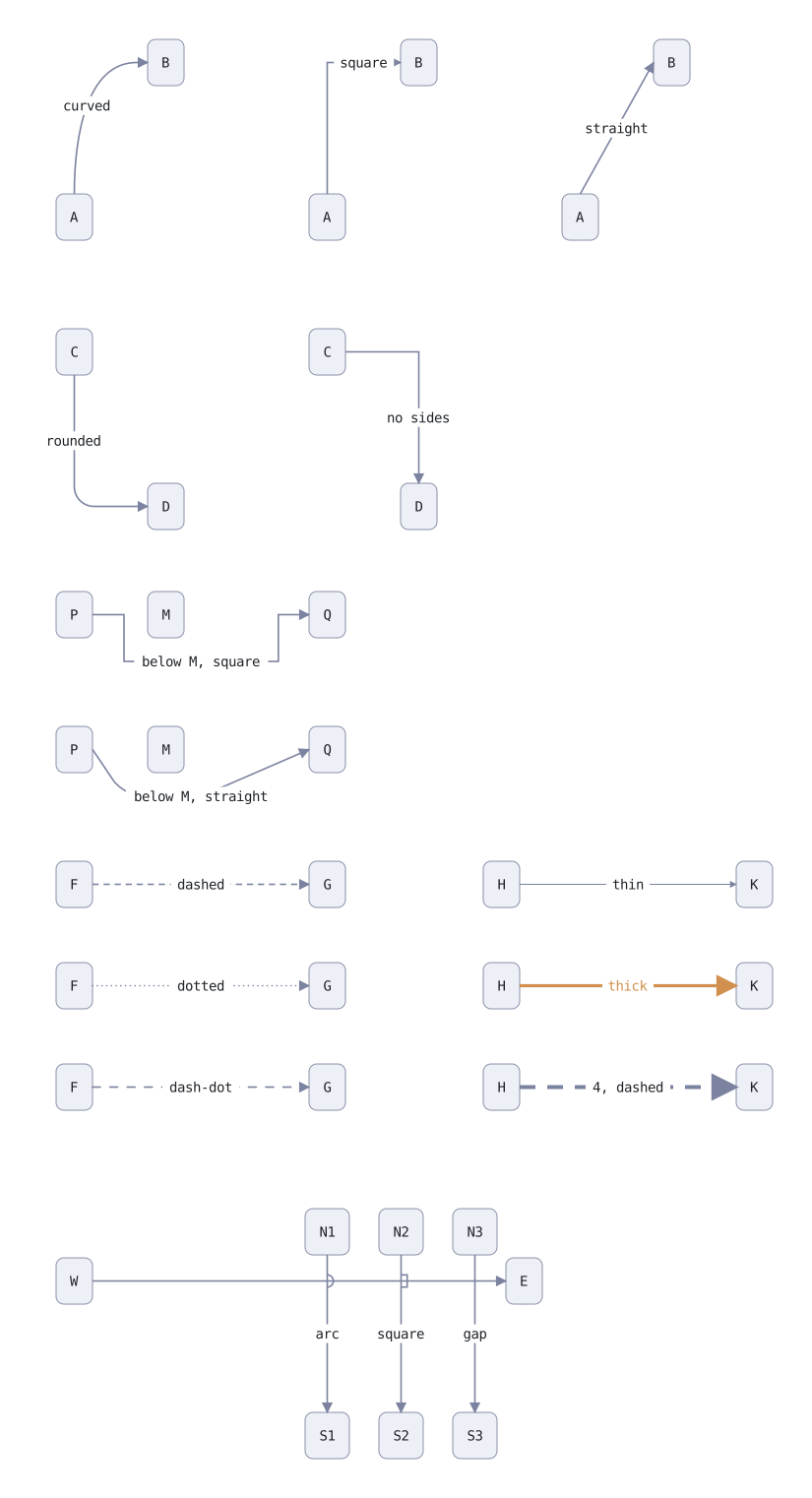
Curved, square and straight lines, dashes, and how crossings are drawn.

line styles
// Everything about how a line is drawn, in its bracket: line: (…). A shape is
// the rule for joining what the file fixed — where the line leaves and which
// way it heads, where it arrives, and any sides it passes.

// Out of A's top and into B's left, three ways.
node a1 "A"
node b1 "B"  right of a1  above a1  (gap: wide)
edge a1 -> b1  "curved"  from: top  to: left

node a2 "A"  right of a1  (gap: 220)
node b2 "B"  right of a2  above a2  (gap: wide)
edge a2 -> b2  "square"  from: top  to: left  line: (path: square)

node a3 "A"  right of a2  (gap: 220)
node b3 "B"  right of a3  above a3  (gap: wide)
edge a3 -> b3  "straight"  from: top  to: left  line: (path: straight)

// Rounded corners, and a square line naming no sides: across first, then down.
node c1 "C"  below a1  (gap: 90)
node d1 "D"  right of c1  below c1  (gap: wide)
edge c1 -> d1  "rounded"  from: bottom  to: left  line: (path: square, corners: rounded)

node c2 "C"  right of c1  (gap: 220)
node d2 "D"  right of c2  below c2  (gap: wide)
edge c2 -> d2  "no sides"  line: (path: square)

// A pass: straight bends only where the clause makes it.
node p1 "P"  below c1  (gap: 220)
node q1 "Q"  right of p1  (gap: 220)
node m1 "M"  right of p1  left of q1  level with p1
edge p1 -> q1  "below M, square"  from: right  to: left  below m1  line: (path: square)

node p2 "P"  below p1  (gap: 90)
node q2 "Q"  right of p2  (gap: 220)
node m2 "M"  right of p2  left of q2  level with p2
edge p2 -> q2  "below M, straight"  from: right  to: left  below m2  line: (path: straight, corners: rounded)

// Patterns and thicknesses.
node f1 "F"  below p2  (gap: 90)
node g1 "G"  right of f1  (gap: 220)
edge f1 -> g1  "dashed"  line: (pattern: dashed)
node f2 "F"  below f1  (gap: normal)
node g2 "G"  right of f2  (gap: 220)
edge f2 -> g2  "dotted"  line: (pattern: dotted)
node f3 "F"  below f2  (gap: normal)
node g3 "G"  right of f3  (gap: 220)
edge f3 -> g3  "dash-dot"  line: (pattern: dash-dot)
node h1 "H"  right of g1  (gap: 140)
node k1 "K"  right of h1  (gap: 220)
edge h1 -> k1  "thin"  line: (thickness: thin)
node h2 "H"  below h1  (gap: normal)
node k2 "K"  right of h2  (gap: 220)
edge h2 -> k2  "thick"  line: (thickness: thick, color: #d2904e)
node h3 "H"  below h2  (gap: normal)
node k3 "K"  right of h3  (gap: 220)
edge h3 -> k3  "4, dashed"  line: (thickness: 4, pattern: dashed)

// Crossings: the later line jumps the earlier one.
node w "W"  below f3  (gap: 150)
node e "E"  right of w  (gap: 420)
node n1 "N1"  below g3  (gap: 100)
node n2 "N2"  right of n1  (gap: 30)
node n3 "N3"  right of n2  (gap: 30)
node s1 "S1"  below n1  (gap: 160)
node s2 "S2"  right of s1  (gap: 30)
node s3 "S3"  right of s2  (gap: 30)
edge w -> e
edge n1 -> s1  "arc"  line: (crossing: arc)
edge n2 -> s2  "square"  line: (crossing: square)
edge n3 -> s3  "gap"  line: (crossing: gap)
example-line-styles__reladraw.svg

Line ends

Arrowheads, dots, diamonds and bars at either end of a line, or none.

line ends
// What can be drawn at each end of a line. The arrow is a mark, a line, a mark:
// a word or a glyph at either end of one or two dashes, either end left off.

style label  text: (color: theme-muted)

node plain   "plain"
node plain2  "a -- b"      right of plain (gap: wide)  style: label
edge plain -- plain2

node arrows  "arrows"      below plain
node arrows2 "a <-> b"     right of arrows (gap: wide)  style: label
edge arrows <-> arrows2

node uml     "inherits"    below arrows
node uml2    "a --|> b"    right of uml (gap: wide)  style: label
edge uml --|> uml2

node whole   "composed"    below uml
node whole2  "a diamond--> b"  right of whole (gap: wide)  style: label
edge whole diamond--> whole2

node part    "aggregates"  below whole
node part2   "a odiamond-- b"  right of part (gap: wide)  style: label
edge part odiamond-- part2

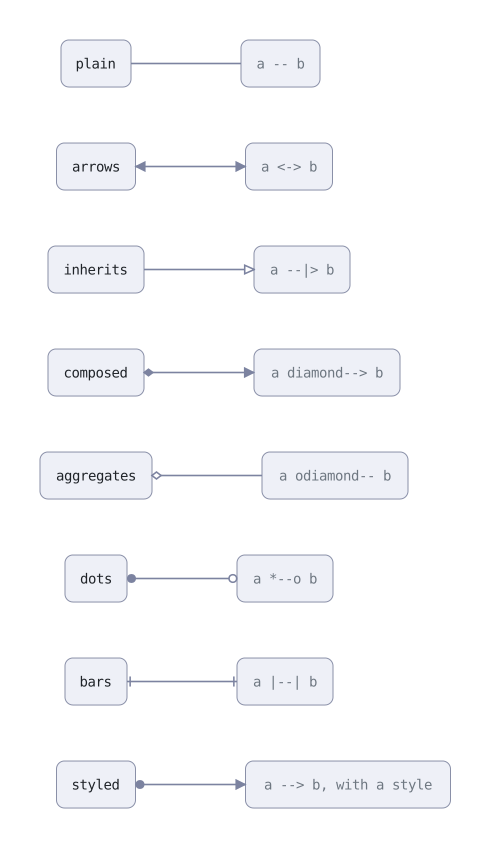
node dots    "dots"        below part
node dots2   "a *--o b"    right of dots (gap: wide)  style: label
edge dots *--o dots2

node bars    "bars"        below dots
node bars2   "a |--| b"    right of bars (gap: wide)  style: label
edge bars |--| bars2

// A style can carry marks too. It fills only the ends the arrow leaves blank,
// so here the arrow's own head stays and the style adds a dot at the start.
style tracked  from-mark: dot  to-mark: oarrow
node styled  "styled"      below bars
node styled2 "a --> b, with a style"  right of styled (gap: wide)  style: label
edge styled --> styled2  style: tracked
example-line-ends__reladraw.svg

Finding of the day - PEL (Pragmatic Emacs Leverage)

There I found built-in timeclock package. Simplified version of Org time tracking.

Finding of the day - PEL (Pragmatic Emacs Leverage)

github
pierre-rouleau/pel: Pragmatic Emacs Leverage
index PDF
here
PEL Documentation
224 PDFs as of [2026-09-04 Fri]

There I found built-in timeclock package. Simplified version of Org time tracking.

timeclock

Built-in Emacs package for time tracking.

  • (describe-package 'timeclock)
  • (◊doc 'timeclock)

Maybe I should try it to stay in "the flow"?

  • (identity timeclock-workday) ;; 28800 / 60 / 60 = 8 hours
(use-package timeclock :ensure nil
  :config
  (display-time-mode +1)
  (timeclock-mode-line-display +1)
  (display-time-mode -1))

Datadog renamed Case Management to Work Management

We use Datadog Case Management at $WORK for managing failed batch jobs. When a job fails, it sends event to EventBridge then to Datadog Events, then a Monitor captures and opens a…

Datadog renamed Case Management to Work Management

We use Datadog Case Management at $WORK for managing failed batch jobs. When a job fails, it sends event to EventBridge then to Datadog Events, then a Monitor captures and opens a new case, providing all the details of failure (links, names, timing, basically what comes in the event). Automation workflow archives duplicated active case by title, so sequential daily runs only lead to the first case. Works really well, about 4000 cases have been created in the last 6 month of usage. AI agents are checking open cases on schedule and do root cause analysis and resolve cases (open PRs with fixes) semi-autonomously (Claude became lazy recently).

Today I noticed that Datadog renamed Case Management to Work Management, and it changes premise quite a lot. Do you remember Slack mission "Slack - where work happens" - well, often it's true, but when it is true, it means somebody doesn't do their real work. If we have a product "Work Management", then, well, why don't we use it to manage work, and manage work in Slack/Notion/Shortcut/Github. Fifth place to manage work. Thank you very much, dear Datadog, you went from a strong concept of a funnel – Alert → Case → Incident – into vague "Work Management"

Case Management API has been always not pleasant: heavy relying on UUIDs, lack of public API methods - can't link cases, can't READ COMMENTS - yes, you can POST a comment, but you can't read it back. To overcome these limitations, I had to check what Datadog UI is doing and wrap it into datadog-mcp-server.

What has changed in the API side of things with this renaming? Absolutely nothing, Work Management doesn't exist nor in API reference nor in the API requests, they still go to https://app.datadoghq.com/api/v2/cases.

textlog

A quiet, text-only microblogging platform, open-source, no JS.

textlog

monkey-id
textlog.el

A quiet, text-only microblogging platform, open-source, no JS.

HN
Show HN: textlog
github
stagas/textlog
website
https://textlog.cc
(no term)
(◊ff 'velpa "textlog.el")

I created handle @hotter and ./src/textlog.el package to send regions to textlog.

Microblogs, related to Textpod.

Another self-hosted microblogs and related:

Implement textlog.el

~/.velppa/velpa/textlog.el

Use new API methods

textlog-post should be using POST /posts method.

Implement textlog-reply command

It should get recent replies to the current user in completing-read.

Upon selection a message, store its id, then post new message (read interactively).

Textlog replies flow

Assign CapsLock to RightControl

I'm using Handy.app (cjpais/Handy) for text-to-speech and hold-to-speak functionality. Which button to use? Right Option rarely used, but I do use it as Hyper key in Emacs, in part…

Assign CapsLock to RightControl

I'm using Handy.app (cjpais/Handy) for text-to-speech and hold-to-speak functionality. Which button to use? Right Option rarely used, but I do use it as Hyper key in Emacs, in particular {H-RET} calls visit-source (visit-source.el).

Right Control also rarely used and does exists on my Keyboardio Model 100. But, it turned out macOS remaps CapsLock to Right Control from the SystemSettings.app.

260804--keyboard-remapping__macos.png

I need some remapping then, for internal keyboard only:

  • CapsLock to Left Control
  • Left Control to Right Control

To achieve that, store the plist to ~/Library/LaunchAgents/com.local.keyboard-remap.plist file.

To rebind live without reboot, run hidutil commands manually. In SystemSettings.app set default CapsLock binding (CapsLock to CapsLock).

<?xml version="1.0" encoding="UTF-8"?>
<!DOCTYPE plist PUBLIC "-//Apple//DTD PLIST 1.0//EN"
  "http://www.apple.com/DTDs/PropertyList-1.0.dtd">
<plist version="1.0">
<dict>
  <key>Label</key>
  <string>com.local.keyboard-remap</string>
  <key>ProgramArguments</key>
  <array>
    <string>/bin/sh</string>
    <string>-c</string>
    <string>
      /usr/bin/hidutil property --set '{"UserKeyMapping":[{"HIDKeyboardModifierMappingSrc":0x700000039,"HIDKeyboardModifierMappingDst":0x7000000E0}]}';
      /usr/bin/hidutil property --matching '{"VendorID":0x0,"ProductID":0x0}' --set '{"UserKeyMapping":[{"HIDKeyboardModifierMappingSrc":0x700000039,"HIDKeyboardModifierMappingDst":0x7000000E0},{"HIDKeyboardModifierMappingSrc":0x7000000E0,"HIDKeyboardModifierMappingDst":0x7000000E4}]}'
    </string>
  </array>
  <key>RunAtLoad</key>
  <true/>
</dict>
</plist>

claude-pager

On I somehow bumped into idea to use emacsclient as EDITOR in Claude Code.

claude-pager

On <2026-06-03 Wed> I somehow bumped into idea to use emacsclient as EDITOR in Claude Code.

Turns out CC respects EDITOR env variable, either from environment or configured in ~/.claude/settings.json:

{"env": {"EDITOR": "emacsclient", "VISUAL": "emacsclient"}}

Even if [Feature Request] Allow configuring external editor for Ctrl-G prompt editing · Issue #18990 · anthropics/claude-code is still in open.

In that issue I spotted this project: gradigit/claude-pager. Fast C transcript pager for Claude Code: no blank Ctrl-G screen, clickable links/files, queued prompt composer. And its sister editor: gradigit/turbodraft.

Tried both. Turbodraft - I don't need another text editor rather than Emacs, so skipping it. But claude-pager looks useful, so I forked it.

First, I wired Emacs into claude-pager; so that it renders transcripts in both CC screen when it waits for the prompt + adds it to Emacs temporary buffer.

This mostly solves clunkiness of copying from claude terminal into Emacs and back - now I press {C-g} in claude and continue editing in Emacs.

Related to Agent SDK billing and parting ways with agent-shell.

This is how my env block looks like in ~/.claude/settings.json.

{
  "env": {
    "EDITOR": "/Users/pavel/.velppa/claude-pager/bin/claude-pager-open",
    "CLAUDE_PAGER_EDITOR": "/Users/pavel/.velppa/claude-pager/emacs/claude-emacs-prompt",
    "CLAUDE_PAGER_EDITOR_TYPE": "gui"
  }
}

{C-g} in claude opens claude-pager-open that generates transcript and pastes it into both terminal and to the temp file to edit in Emacs, then runs claude-emacs-prompt shell file that calls elisp file which loads into the buffer, assigns keybindings etc.

Setup involves adding hooks:

SessionStart hook:
     26:            "command": "/Users/pavel/.velppa/claude-pager/shim/save-session-transcript.sh"

Then I rewrote the binary from C to Zig. Rewrite used Superpowers to develop a spec first, then launch a series of agents. It took 4+ hours for CC to finish rewrite, it was ready in the morning. It used all extra usage (42 EUR) in fast mode in first 20 minutes.

7000 loc in C => ??? in Zig.

Now I understand the C well.

Another interesting project from the same author:

  • gradigit/confetti - Lightweight confetti animation for macOS — fire colorful confetti from your screen corners

Copy buffer-name with easy-kill

easy-kill Emacs package allows killing multiple things, switching between them on the fly. I use it to quickly grab the buffer-file-name (full path or file name only), using {M-w b…

Copy buffer-name with easy-kill

easy-kill Emacs package allows killing multiple things, switching between them on the fly. I use it to quickly grab the buffer-file-name (full path or file name only), using {M-w b}.

github
leoliu/easy-kill

Keybindings:

{M-w} without active region
copy current line, same as {x y} in meow-normal-mode
{M-w C-w} without active region
kill current line, same as {x s} in meow-normal-mode
{M-w b}
copy current full path to buffer-file-name
{M-w b 0}
copy current buffer-file-name
{M-w b -}
copy current directory

On <2026-06-04 Thu> I added {M-w B} to copy current buffer-name, useful to paste into Claude Code (running under ghostel for me).

Here's the configuration block:

(use-package easy-kill
  :config
  (keymap-global-set "<remap> <kill-ring-save>" #'easy-kill)
  (defun easy-kill-on-buffer-name (_n)
    "Get current `buffer-name'."
    (if (easy-kill-get mark)
        (easy-kill-echo "Not supported in `easy-mark'")
      (easy-kill-adjust-candidate 'buffer-name (buffer-name))))
  (add-to-list 'easy-kill-alist '(?B buffer-name)))
  1. Define function easy-kill-on-buffer-name.
  2. Add binding to 'easy-kill-alist.

Agent Skills collections

Okay, there are many of Agent Skills collections.

Superpowers

An agentic skills framework & software development methodology that works.

Superpowers

An agentic skills framework & software development methodology that works.

github
obra/superpowers
CAVEMAN vs Superpowers

Stacking: orthogonal. Run both → superpowers process + caveman terse output.

caveman

Purpose
output compression, cuts tokens ~75%
Affects
how Claude speaks — style only
Skills
caveman, caveman-commit, caveman-review, caveman-compress, caveman-stats, caveman-help
Agents
cavecrew-investigator, cavecrew-builder, cavecrew-reviewer (compressed output)
When active
persistent mode (every response)
Token cost
saves tokens

superpowers

Purpose
workflow scaffolding, methodology + process skills
Affects
what Claude does — multi-step procedures
Skills
brainstorming, writing-plans, executing-plans, test-driven-development, systematic-debugging, subagent-driven-development, dispatching-parallel-agents, using-git-worktrees, requesting-code-review, receiving-code-review, verification-before-completion, finishing-a-development-branch, writing-skills, using-superpowers
Agents
none direct
When active
invoked per-task (Skill tool)
Token cost
spends tokens (more thorough flows)